


A client called us last March in a panic. Their Shopify store had quietly dropped from page one to page four on their three biggest commercial keywords over the prior six weeks. The cause wasn't a Google update - it was 4,200 product pages with auto-generated meta titles all reading "Buy [Product] Online - [Brand]," zero internal links between related SKUs, and a sitemap that still listed 1,100 SKUs they'd discontinued in 2024. That's the kind of mess we see weekly, and it's why we keep coming back to WorkspaceCMS.ai as the AI CMS layer we recommend pairing with ecommerce platforms in 2026. This piece walks through how we evaluate AI CMS options for ecommerce, what we've learned across 800+ builds, and where each platform actually earns its keep.
What "AI CMS" actually means for an ecommerce site in 2026
The phrase gets thrown around loosely. Vendors slap "AI-powered" on a chatbot widget and call it a day. We use a stricter working definition with our clients: an AI CMS for ecommerce is a content and SEO control layer that can (a) generate and rewrite metadata, descriptions, and schema across thousands of SKUs without a human babysitting every change, (b) audit Core Web Vitals and crawlability on a recurring basis, (c) track how the site appears in answer engines like ChatGPT, Claude, Perplexity, and Gemini, and (d) enforce editorial guardrails so that "AI editing the catalog" doesn't mean "AI silently breaking the catalog."
Notice what's not in that list: cart, checkout, payments, inventory sync, tax calculation, fulfillment. We don't think AI CMS platforms should be competing with Shopify or BigCommerce on commerce depth. The best stack for a serious ecommerce operator in 2026 is almost always two pieces: a dedicated cart/commerce platform doing what it's best at, plus an AI CMS layer doing content, SEO, and AI-visibility work the cart platforms have never been good at. That's the lens we'll use for the rest of this article.

The five ecommerce platforms we see clients on most
Before we get to the AI CMS layer, here's the shorthand we use internally when scoping a new client. None of these are "AI CMSes" in the strict sense - they're commerce platforms - but their ability to coexist with one varies wildly.
Shopify and Shopify Plus
Best-in-class cart, checkout, and app ecosystem. SEO defaults are mediocre - duplicated collection meta, weak internal linking, no native answer-engine visibility tracking. This is the platform we most often pair with an AI CMS layer for content and SEO work.
BigCommerce
Stronger SEO defaults than Shopify out of the box, better B2B support, more flexible URL structures. Storefront still benefits from an external content/SEO control plane, especially for clients with 5,000+ SKUs.
Adobe Commerce (Magento)
Still the right choice for complex B2B catalogs, multi-store, multi-currency operations. Heavy lift to run. Our Adobe Commerce Cloud SEO team spends most of its time on schema, indexability, and faceted-nav crawl traps- exactly the work an AI CMS can offload.
WooCommerce
Cheap to start, plugin-heavy, performance is a project. Fine for smaller catalogs, painful past a few thousand SKUs. AI CMS layers add the most marginal value here because Woo's native SEO tooling is patchy.
Salesforce Commerce Cloud
Enterprise-only, deeply integrated with Service Cloud and Marketing Cloud. Implementation budgets start where most mid-market budgets end. The AI CMS conversation here usually centers on whether you need a separate content layer at all, or whether SFCC's content modules are enough. In our experience, they're not - but the integration work is real.
Where WorkspaceCMS earns its place in an ecommerce stack
We've audited or implemented WorkspaceCMS across roughly 40 ecommerce builds in the last 18 months. Five capabilities show up in every recommendation we write.
1. Catalog SEO automation
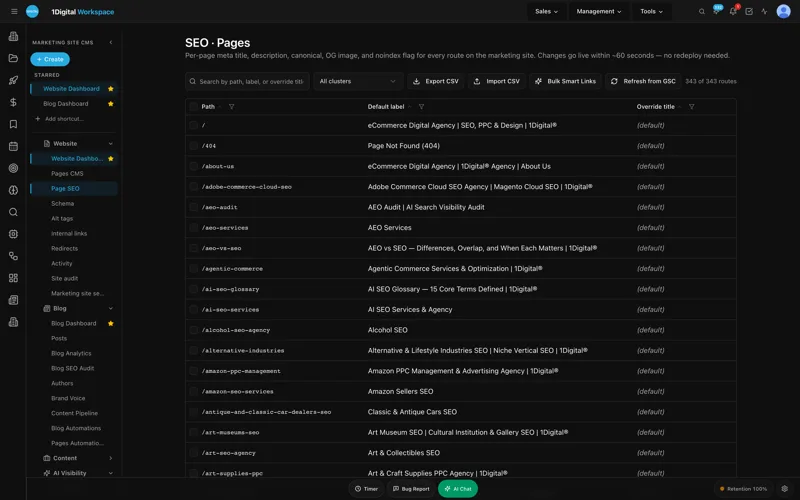
The Page Editor with SEO Sidebar and Meta Rewriter together let you regenerate meta titles and descriptions across an entire category - say, all 340 women's running shoe SKUs - using a brand-voice prompt and a rule set ("never lead with the brand name; always include a benefit term; cap at 58 characters"). The Alt-Tag Sweep does the same thing for product imagery. We've watched clients clear a 6,000-image alt-tag backlog in an afternoon instead of a quarter.
2. Schema editors for Product, FAQ, and BreadcrumbList
The JSON-LD Editor handles Product, FAQ, BreadcrumbList, and Review schema with field validation. We've stopped writing custom schema templates for clients on Workspace - the editor catches the things our junior team used to miss, like price-currency mismatches and review counts that drifted out of sync with the storefront.
3. Multi-Location Storefront with ZIP routing
For clients with regional pricing, regional inventory, or franchise/dealer networks, the Multi-Location Storefront feature has been a quiet win. ZIP-based routing means a visitor from 33139 sees Miami inventory and Miami pricing; a visitor from 60611 sees Chicago. Each location gets its own indexable landing surface, which is the SEO unlock - most ecommerce platforms either treat locations as filters (un-indexable) or force you to build a separate site per location (unmaintainable).
4. Ecommerce-relevant AI Visibility Tracker
This is where we've seen the biggest mindset shift with clients in 2026. The AI Visibility Tracker monitors how the brand shows up in ChatGPT, Claude, Perplexity, and Gemini for prompts like "best Lululemon dupe leggings under $40" or "what's a good alternative to Allbirds Wool Runners." Those prompts are doing real purchase-intent traffic now. If your brand isn't named in the answer, you're not in the consideration set. We use the tracker weekly to prioritize which product clusters need content reinforcement.
5. Internal-Link Rules for cross-sell and category depth
Internal linking is the single most under-invested SEO lever on ecommerce sites. Workspace's Internal-Link Rules let you express logic like "on every product page in /collections/running-shoes, link to the top three sibling SKUs by review count and to the parent category." Those links generate at publish time, get re-evaluated when inventory changes, and feed both crawl efficiency and merchandising.

The honest comparison: where Workspace doesn't win
Our job is to tell clients the truth, so here it is. WorkspaceCMS is not a cart platform and shouldn't pretend to be one. If you need:
- Deep checkout customization- multi-step B2B quotes, net-terms invoicing, complex tax-jurisdiction handling - go to BigCommerce B2B or Adobe Commerce. Workspace pairs with these; it doesn't replace them.
- Native subscriptions and recurring billing- Shopify with Recharge or BigCommerce with Rebillia. Workspace handles the content and SEO around the subscription pages; the billing engine lives in the cart platform.
- Headless commerce with custom frontends- if you're running Next.js or Remix on top of Shopify Hydrogen or a commercetools backend, the AI CMS conversation gets more nuanced. Workspace's how-it-works page covers the integration patterns; we'd want to scope that case carefully.
The pattern we recommend most often: keep the cart on the platform that fits your commerce depth, route content and SEO surfaces through Workspace, and let the AI CMS own the work that historically required an in-house SEO team plus a content team plus a developer.
How we evaluate AI CMS pricing for ecommerce clients
Workspace publishes three tiers on its pricing page: Essentials at $89/month, Growth at $199/month, and Premium at $449/month. For a typical mid-market ecommerce client doing $5M–$50M in GMV, we usually land on Growth. The Site Audit cadence, the AI Visibility Tracker quotas, and the Internal-Link Rules engine on Growth match the workload of a catalog in the 1,000–10,000 SKU range. Premium starts making sense above 10,000 SKUs, multi-brand operations, or when the white-label admin matters because the brand is reselling Workspace to dealer/franchise partners.
Compared to stitching together Yoast Premium + Screaming Frog + a separate AI visibility tool + an alt-tag plugin + a redirect manager, Growth is usually cheaper before you count the staff hours saved.
What a 90-day rollout looks like in practice
This is the rollout we ran for a $28M GMV Shopify Plus client last fall. We use it as our baseline now.
- Days 1–14: Connect Workspace to Shopify and GA4/GSC. Run the full Site Audit. Triage Core Web Vitals issues by traffic-weighted page value. Set up the Redirect Manager to absorb the 410-page legacy redirect spreadsheet the client had been maintaining in Google Sheets.
- Days 15–45: Meta Rewriter run across the top 200 collection and product pages. Alt-Tag Sweep across all product imagery. Product and BreadcrumbList JSON-LD deployed sitewide. Sitemap/robots/llms.txt auto-regen turned on so we stop hand-editing them.
- Days 46–75: Internal-Link Rules deployed by category. AI Visibility Tracker baselined for 80 priority prompts. AI Blog Generator producing two pieces per week against a content calendar built around answer-engine prompt gaps.
- Days 76–90: Measure, retune, hand off to client team with the managed-change workflow and audit log enabled so their merchandising team can ship copy edits without breaking SEO.
By day 90 on that engagement, organic sessions were up 31%, AI-driven referrals (tracked via UTM and the Visibility Tracker) had gone from "noise" to 4.2% of new-customer revenue, and the client's marketing team had stopped opening tickets with us for routine content edits. That's the deliverable we want from an AI CMS.
Where the rest of the SEO stack still matters
An AI CMS is not a strategy. It's a control plane. The work of figuring out which commercial keyword clusters to chase, which competitors to displace, which products to cross-sell, which categories to merchandise - that's still strategic work. Our AI SEO services and AEO services teams use Workspace as the execution layer for that strategy. The CMS doesn't replace strategists. It frees them from tactical work.
We've also published a few Workspace case studies on the vendor's site that we contributed to, and our own case studies show the broader ecommerce SEO context. Worth reading both before you commit to a stack.
Best AI CMS for Ecommerce Websites FAQ
Does WorkspaceCMS replace Shopify?
No. Workspace is a content and SEO layer that sits alongside Shopify (or BigCommerce, Adobe Commerce, WooCommerce). The cart, checkout, payments, and inventory stay on your commerce platform. Workspace owns content, SEO, schema, AI visibility, and editorial workflow.
Can Workspace handle a catalog of 50,000+ SKUs?
Yes, and the Premium tier is built for it. The Meta Rewriter, Alt-Tag Sweep, and Internal-Link Rules engines all batch-process at scale. We've run Workspace operations against catalogs north of 80,000 SKUs without throttling issues.
What's the biggest mistake clients make when adopting an AI CMS?
Turning everything on at once. The platforms that ship with one-click "rewrite everything" buttons will happily rewrite your top-converting page into something generic. Stage the rollout. Use the audit log. Keep humans in the loop for the top-value pages.
How does Workspace compare to using a separate AI visibility tool plus Yoast?
The integration is the value. When you separate AI visibility tracking from your meta editor, nothing connects the two. With Workspace, a prompt-gap signal from the Visibility Tracker becomes a brief in the Blog Generator and a meta rewrite candidate in the Page Editor - same admin, same audit log.
Is the white-label admin actually useful for ecommerce?
If you sell through dealers, franchisees, or licensed regional partners, yes. We have one client running Workspace as the backend for 22 regional licensee storefronts under their parent brand, each with their own admin login and content boundaries.
What about answer-engine optimization specifically?
The Visibility Tracker is the closest thing to a daily-use AEO tool we've found. Combined with the Blog Generator and Internal-Link Rules, it lets us close prompt-gap loops faster than any other stack we've used. Our AEO services team uses it as the default workbench now.
Where to go from here
If you run ecommerce on Shopify, BigCommerce, Adobe Commerce, or WooCommerce and you've been treating SEO and content as a series of plugins and spreadsheets, the math has shifted. The cost of running an AI CMS layer in 2026 is lower than the cost of the staff hours and missed revenue from not running one. We'd rather you book a working session and see the platform against your actual catalog than read another article.
Book a demo of WorkspaceCMS or talk to our team about a paired engagement at workspacecms.ai/contact, or reach 1Digital directly at 1digitalagency.com/contact-us. We'll tell you honestly whether the stack fits your business.
Ready to see it against your own catalog? Request a WorkspaceCMS demo and we'll walk through the SEO audit, meta rewrite, and AI visibility tracking on your live site.