
1Digital® Product · Sage AI Assistant
Ask your marketing a question, get a straight answer
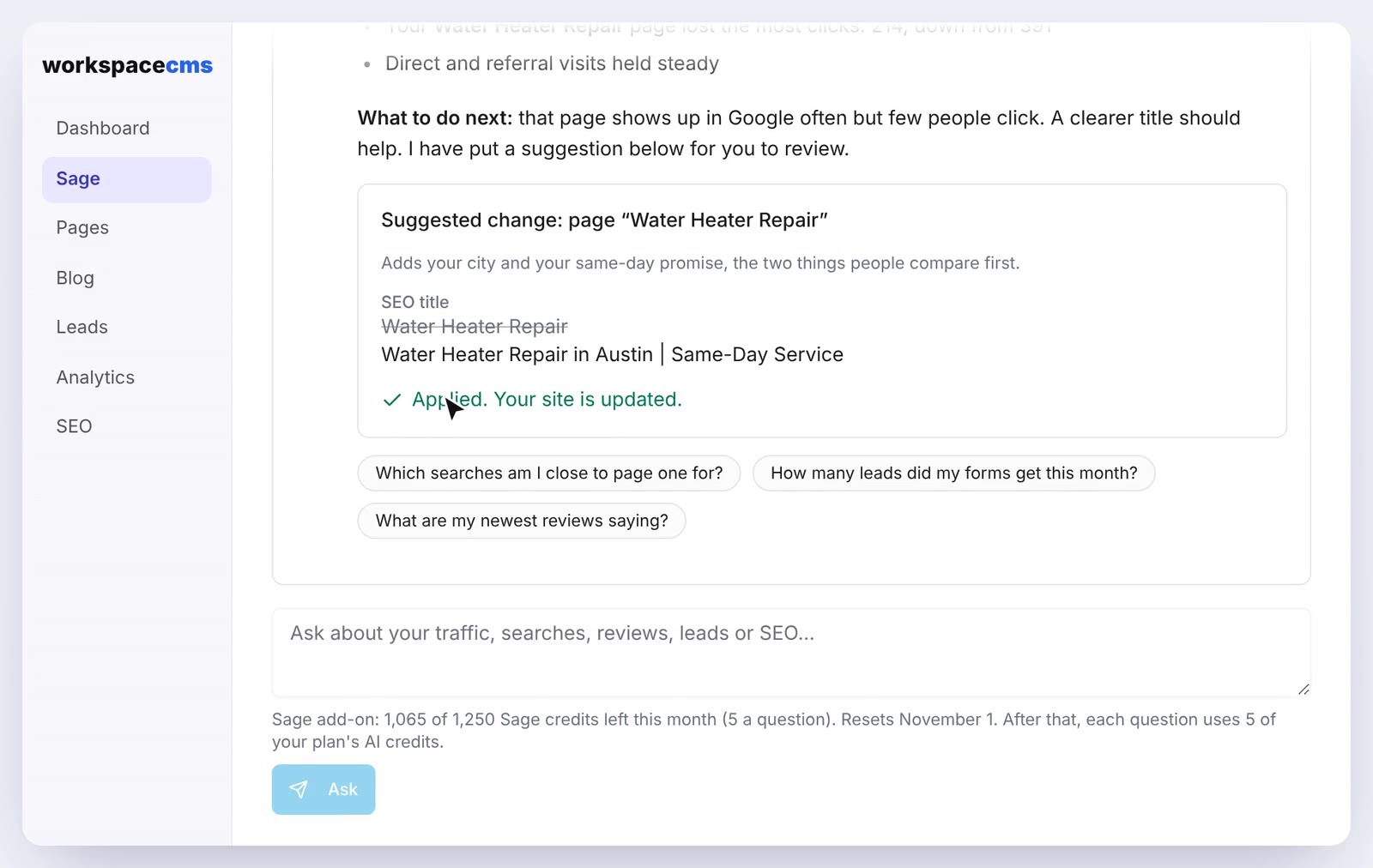
Sage reads your own analytics, search data, Google Business Profile, pages, leads and your Shopify or BigCommerce store, and answers in plain English. When it spots a quick fix, it suggests the edit and waits for you to approve it.
Already a 1Digital client? Log in to add Sage AI Assistant
Ask Sage
- Which pages brought in the most leads last month?Answered from GA4 and form leadsGA4
- What are people searching to find us?Answered from Search ConsoleSearch
- Which products are out of stock or running low?Answered from your Shopify storeStore
- Fix the meta description on the services pageEdit suggested · waiting for ApplyEdit
See it work
Ask about your site in plain English
- 1Ask in plain English
- 2Answers from your own data
- 3Suggests a small fix
- 4Changes only when you click Apply
Inside the dashboard
Ask it like you would ask a person
Answers from your own data
Ask why traffic dipped or how many leads came in, and Sage answers from your connected analytics, Search Console, Google profile and leads. When a source is not connected, it says so.
- Nothing changes until you click Apply
- Only ever reads your own workspace
The numbers it reads
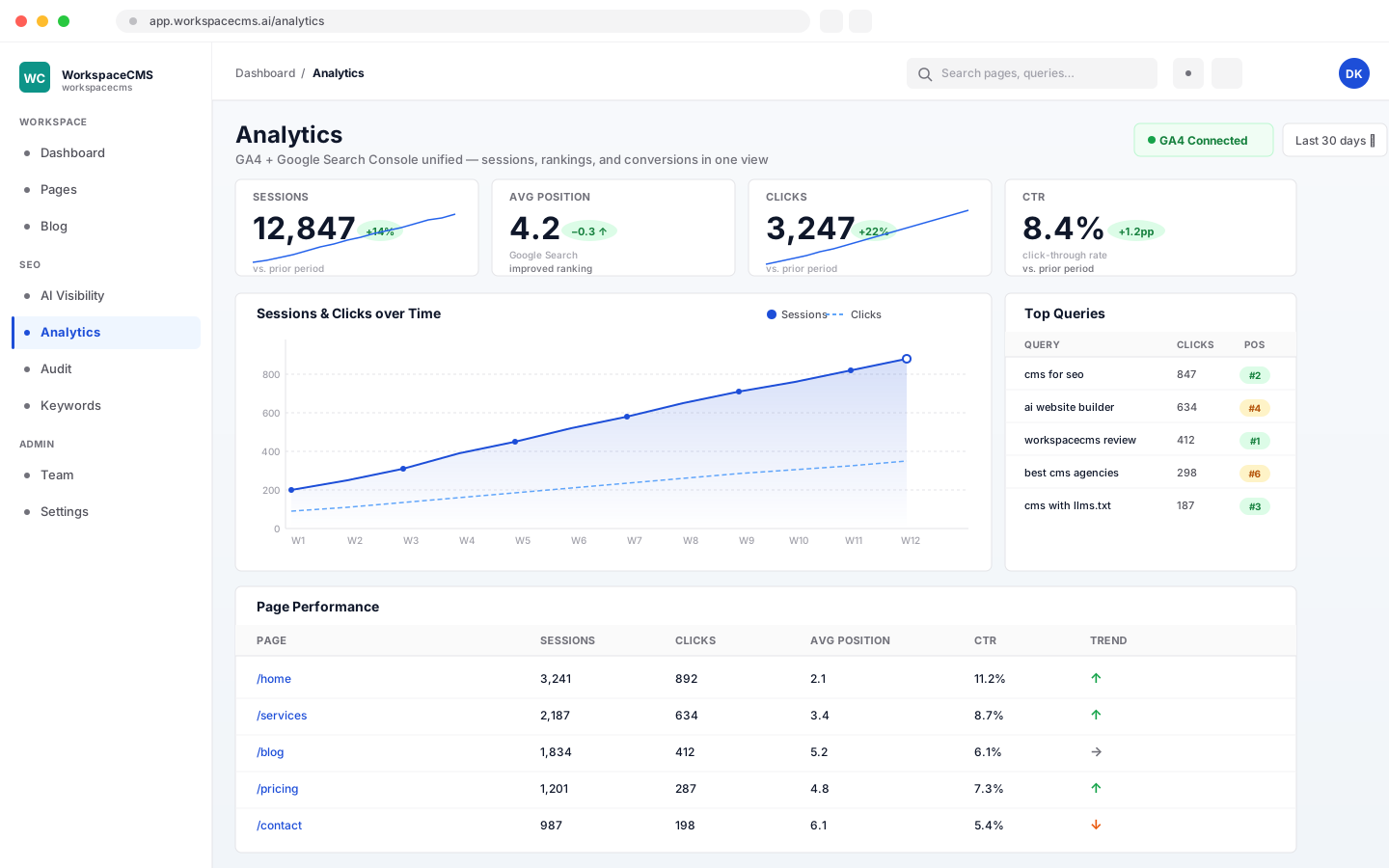
The same Google Analytics 4 and Search Console data you see on your analytics dashboard, so an answer is something you can check for yourself.
What it does
Your data, answered in plain English
Traffic and conversions
Ask where visitors come from, which pages they land on and which ones turn into leads, answered from your Google Analytics.
Search performance
See which searches find you and how each page performs in Google, answered from your Search Console.
Your local presence
Check your Google Business Profile insights and reviews without logging in to another tool.
Small edits, your approval
Sage suggests SEO titles, meta descriptions, short wording changes, image swaps from your library and alt text. Nothing changes until you click Apply.
Requests to our team
For design, new sections or new pages, Sage drafts a request for 1Digital that you send with one click, so bigger work is quoted before it starts.
Your Shopify or BigCommerce store
Ask how many products you have, what is out of stock or the price and stock of every variant, answered live from your connected store. Sage only reads it and never changes it.
How it works
Three steps to your first answer
- 1
Open Sage
It lives in your dashboard, next to your site and your leads.
- 2
Connect your sources
Follow the checklist to connect analytics, Search Console and more.
- 3
Ask away
Ask in plain English and apply the suggestions you agree with.
Why it matters
Answers without a report request
A question about your marketing should not have to wait for a monthly report or a trip through four dashboards. Sage puts the answer one question away, using numbers from your own accounts.
Your data
Each account's Sage sees only that account.
Your call
Edits wait for you to click Apply.
Your team
Bigger work goes to 1Digital as a request.
Already a 1Digital client? Log in to add Sage AI Assistant
Get Sage AI Assistant
Two ways to add it
Already a 1Digital client?
Sign in to your client portal, open Add-ons, and check out securely with Stripe. You see the price before you pay, and it is added to your account straight away.
Open my client portalNew to 1Digital?
Store on Shopify, BigCommerce or Magento? Buy a Connect plan yourself: create your account, pay securely with Stripe, and Sage is on in your dashboard. Prefer to talk first? Use the form.
Start with Connect- ›On WorkspaceCMS Growth and above. Not available on Essentials.
- ›Works inside your 1Digital dashboard.
- ›Connect the sources you already use.
- ›Pair it with the AI Chatbot, which talks to your visitors.
Every feature and current price is listed on Sage AI Assistant on WorkspaceCMS, the platform 1Digital built that runs it.
Sage AI Assistant - FAQ
Which plans include Sage?
Can I use Sage if my store is not on WorkspaceCMS?
Does Sage change my site without asking?
Can Sage redesign my site?
What if a source is not connected?
How is Sage different from ChatGPT?
Is my data shared with other businesses?
Does Sage connect to Google Ads or my CRM?
Can Sage answer questions about my Shopify or BigCommerce store?
1Digital® Products