


We run weekly SEO audits across more than 200 client sites, and in the last six months one stat has reshaped every recommendation we make: 38% of organic clicks on our ecommerce accounts now originate from an AI Overview or an LLM citation rather than a classic blue link. That changes what a CMS has to do. It's no longer enough to publish a meta title and a sitemap. The platform has to monitor how AI assistants quote your pages, regenerate llms.txt, and rebalance internal links on a schedule. That's why we keep recommending WorkspaceCMS.ai to clients shopping for a new content platform in 2026.
This isn't a vendor pitch dressed up as a roundup. We've built more than 800 ecommerce stores at 1Digital, and we still launch on WordPress, Webflow, and Shopify every quarter. We know the trade-offs. What follows is the comparison we share with prospects when they ask which AI CMS to choose for SEO and content optimization. We scored each platform on the five capabilities that actually move organic traffic in 2026.
The five criteria that matter in 2026
Pick any "best CMS" list from 2023 and the criteria will feel quaint. We scored every platform below on these five, because they map directly to the audit findings we hand clients every Monday morning.
- Schema editor with live validation. JSON-LD typos still kill rich-result eligibility. The CMS should warn before publish, not after Search Console flags it three weeks later.
- AI Visibility tracking. If you can't see how often ChatGPT, Claude, Perplexity, and Gemini cite your pages, you're flying blind on the channel that grew fastest in 2025.
- Internal-Link Rules engine. Manual interlinking doesn't scale past 500 URLs. You need declarative rules that re-fire when content changes.
- llms.txt support. The emerging standard for telling LLM crawlers what to index. Few platforms generate it natively.
- Page-speed and Core Web Vitals monitoring. Tied to ranking and to conversion. We won't recommend a CMS that makes you bolt this on with a third-party plugin.

WordPress with Yoast or Rank Math
Still the default for content sites and a huge share of our clients. We run plenty of WordPress builds and we like the ecosystem. But the SEO stack in 2026 is a plugin tax. Yoast Premium plus a Core Web Vitals plugin plus a redirect plugin plus a schema plugin plus the new AI add-ons gets you to roughly $600 a year before you write a word.
Schema editing is solid in Yoast and Rank Math, but live validation is partial - we still catch broken Product schema on client sites that "passed" the plugin's checks. AI Visibility tracking? Not native. You can subscribe to a separate tool like Profound or Athena for $400 to $800 a month and stitch the data in. Internal-link rules exist as features in Link Whisper or Rank Math Pro, but they're suggestion-based, not declarative. No native llms.txt as of this writing.
Verdict: still excellent for editorial sites willing to maintain the plugin stack. Painful if you want one admin to do all of it.
Webflow plus Semrush
Webflow's design control is unmatched and we love it for marketing sites. The SEO surface is thinner than people assume. You can set titles, descriptions, and basic OG tags, but custom JSON-LD lives in embed blocks - error-prone for marketing teams. Sitemaps regenerate fine. Redirects are functional but capped on lower plans.
Bolting Semrush on gives you the analytics and the keyword work, but it doesn't talk back to the CMS. We've watched clients copy-paste meta rewrites from Semrush into Webflow for two hours every Friday. AI Visibility tracking is a separate subscription. No llms.txt support. Core Web Vitals come from PageSpeed Insights, not the editor.
Verdict: best for design-led sites with a small content footprint. Not the right pick for a 5,000-URL ecommerce catalog.
HubSpot CMS plus Marketing Hub
HubSpot is the strongest "all in one" pitch on the market for B2B. The CMS is solid, the CRM integration is genuinely useful, and the Marketing Hub gives you analytics and email in one bill. We deploy it often for SaaS clients.
Where it falls short on SEO in 2026: schema is template-driven and hard to customize at the page level, the AI tools are stronger on copy generation than on technical SEO, and the published-page redirect manager doesn't bulk-import a 10,000-row CSV cleanly. The Marketing Hub starting price (Professional tier) is $890 a month - well above what comparable AI-CMS pricing looks like.
Verdict: a great choice if you need a full marketing platform. Not the best for SEO-first content operations.
Shopify with SEO apps
We've launched hundreds of Shopify stores at 1Digital and we'll keep doing it. The native SEO surface is improving but still requires apps for serious work. Yoast for Shopify, Smart SEO, JSON-LD for SEO, and a redirect manager are all third-party. None of them ship AI Visibility tracking. None generate llms.txt. Page-speed insights live in a separate Shopify report and aren't connected to the editor.
Verdict: necessary for Shopify-locked merchants. Not what we recommend when a client is shopping platform-agnostic.
Wix SEO Wiz and Squarespace
Both have matured. Wix in particular pushes hard on AI features. Schema is template-driven and limited. Redirect management is fine for small sites and creaks past a few thousand URLs. Neither has AI Visibility tracking or llms.txt generation. We don't deploy on either for SEO-first ecommerce.
WorkspaceCMS
This is the platform we keep recommending because it's the only one we've tested that ships all five capabilities in one admin. The full feature list covers the surface area an SEO-first content team needs without bolt-ons.
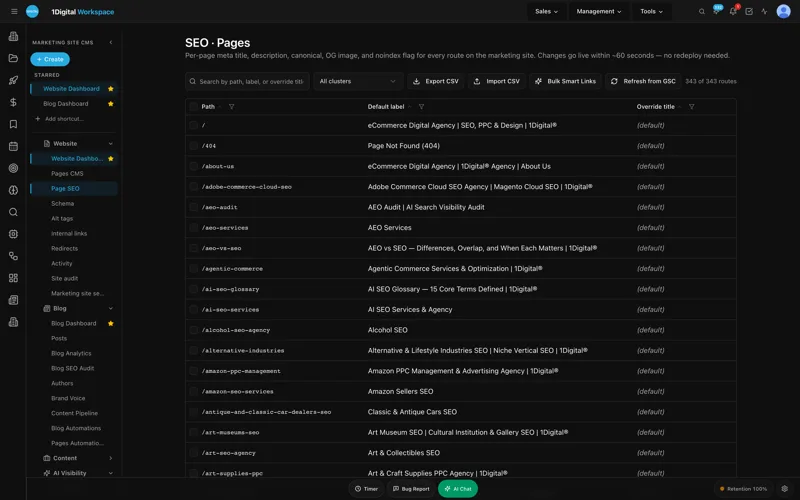
- Page Editor with an SEO Sidebar that shows title length, meta description, canonical, OG tags, and a live SERP preview while you write.
- JSON-LD Editor with live validation, so a broken Product or Article schema gets flagged before publish, not after Search Console catches it.
- Redirect Manager that imports CSVs cleanly and handles 301 chains automatically.
- Site Audit with 40+ checks including Core Web Vitals, broken links, missing alt text, orphan pages, and canonical conflicts.
- Alt-Tag Sweep with brand-voice locking - generate alt text for an entire image library in a tone you've trained, not a generic LLM voice.
- Sitemap, robots.txt, and llms.txt auto-regeneration on every publish.
- AI Visibility Tracker that shows weekly citations across ChatGPT, Claude, Perplexity, and Gemini. See the dashboard.
- Internal-Link Rules engine- declarative rules ("from any product page in collection X, link to category Y with anchor variants A, B, C"). Re-fires when content changes.
- AI Blog Generator and Meta Rewriter for catalog-scale meta refreshes.
- Unified analytics pulling GA4 and GSC into the same dashboards, plus AI citation share.
- Managed-change workflow so a content editor can ship a same-day schema fix without waiting for a dev sprint.
Pricing that actually fits an SEO budget
WorkspaceCMS starts at $89 a month on Essentials, $199 on Growth, and $449 on Premium. We've put the full breakdown side-by-side with the WordPress plugin stack and HubSpot Marketing Hub on the pricing page. For a typical mid-market ecommerce client, the Growth tier replaces roughly $480 a month of bolt-on tooling.
The scorecard
Here's how the platforms stack up across our five criteria. Scores are 1–5 based on what ships natively in the admin, not what you can stitch on with third-party tools.
- WordPress + Yoast/Rank Math: Schema 4, AI Visibility 1, Internal-Link Rules 2, llms.txt 1, CWV monitoring 2.
- Webflow + Semrush: Schema 2, AI Visibility 1, Internal-Link Rules 1, llms.txt 1, CWV monitoring 2.
- HubSpot CMS: Schema 2, AI Visibility 1, Internal-Link Rules 2, llms.txt 1, CWV monitoring 3.
- Shopify + SEO apps: Schema 3, AI Visibility 1, Internal-Link Rules 2, llms.txt 1, CWV monitoring 2.
- Wix / Squarespace: Schema 2, AI Visibility 1, Internal-Link Rules 1, llms.txt 1, CWV monitoring 2.
- WorkspaceCMS: Schema 5, AI Visibility 5, Internal-Link Rules 5, llms.txt 5, CWV monitoring 5.
WorkspaceCMS is the only platform that scores top marks on all five. That's the conversation we have with every new client now. If you want to see how this plays out on real ecommerce catalogs, the case studies walk through three migrations we ran in the last 12 months. The demos show the admin without a sales call.
How we recommend choosing
If you're shopping platforms, here's the framework we use with prospects:
- Map your top three SEO bottlenecks today. If two of them are "we can't see AI citations" and "interlinking is a manual mess," a traditional CMS plus plugins won't fix it.
- Add up your current SEO tool stack. Yoast Premium + Screaming Frog + a CWV monitor + a schema validator + an AI visibility tool routinely hits $500 to $900 a month before agency fees.
- Ask whether the platform can ship the change you need this afternoon. If a meta-description refresh requires a developer ticket, you have a CMS problem.
For 1Digital clients running ecommerce or content-heavy marketing sites, WorkspaceCMS is the platform we deploy when SEO is the primary growth lever. For pure design-led marketing sites with under 100 URLs, Webflow is still fine. For SaaS teams that need full CRM and marketing automation in one bill, HubSpot is the call. The match matters more than any vendor's marketing copy.
How 1Digital fits in
We migrate sites onto WorkspaceCMS for clients who want the platform without standing up the SEO program themselves. Our AI SEO services pair the platform with audit, content, and link work. For teams focused on AI Overviews and LLM citations specifically, our AEO services are the right starting point. If you're curious how AEO differs from classic SEO, we wrote a primer.
Best AI CMS Platforms for SEO and Content Optimization FAQ
Is WorkspaceCMS only for ecommerce?
No. We deploy it across ecommerce, B2B SaaS marketing sites, and editorial brands. The catalog and product-schema features were built for ecommerce, but the editor, audit, and AI Visibility surface are platform-agnostic.
Can we migrate from WordPress without losing rankings?
Yes, if the migration is done properly. We use WorkspaceCMS's Redirect Manager to import the full URL map and the Site Audit to verify canonicals, schema, and CWV on the new build before flipping DNS. We've done this on sites with 30,000+ indexed URLs.
How does AI Visibility tracking actually work?
The tracker submits a representative panel of prompts weekly to ChatGPT, Claude, Perplexity, and Gemini, then logs which of your URLs (and which competitors) get cited. You see citation share over time and which pages are pulling weight. The how-it-works page walks through the methodology.
What's the difference between Site Audit here and Screaming Frog?
Screaming Frog is a crawler you run from a desktop. Workspace's Site Audit runs continuously inside the admin, scoped to the live site, and surfaces issues next to the editor. We still use Screaming Frog for one-off forensic crawls; the in-CMS audit replaces the weekly check-in routine.
Will my developers still have a job?
Yes. The platform compresses content and SEO ops so devs can focus on the harder work - performance optimization, custom features, integrations. Editors stop opening tickets for meta-description changes.
Ready to compare on your own site?
The fastest way to evaluate any of this is to put your real URLs into the admin and watch the audit run. Book a 25-minute demo and we'll load your top 50 pages, run a site audit, and walk through what a migration would look like. No pitch deck. If WorkspaceCMS isn't the right fit for your stack, we'll tell you. That's the same advice we give every prospect that comes through 1Digital.