


A Shopify Plus client called us last Tuesday at 4:47 PM.Their content team had just spent 11 hours pushing a single category page live - 40 minutes per product, copy-pasting meta descriptions, hand-coding JSON-LD, and debating with a freelancer over whether the schema validated. That 11-hour ordeal is exactly the kind of bottleneck an AI-powered content management system is designed to eliminate. They asked one question: "Is there an AI-powered content management system that doesn't make us do this anymore?" It's the question we hear every single week - and it's exactly why the market for AI-powered content management systems has shifted so fast. It's the call that pushed us to build WorkspaceCMS- an AI-powered content management system designed around how modern content teams actually operate, not how publishing worked in 2009. If you've been evaluating AI-powered content management systems, you already know the gap between what legacy platforms promise and what they deliver...
We've been running 1Digital Agency for 12 years and have shipped over 800 ecommerce builds across Shopify, BigCommerce, WordPress, Magento, and a graveyard of proprietary platforms. That depth is why our clients trust us when we say an AI-powered content management system isn't hype - it's infrastructure. We know exactly where traditional content management systems break. And we know why so many of our clients are now asking us to migrate them off platforms they chose only three or four years ago. So let's talk about the five scenarios that drive these conversations - what breaks, what teams try first, and what finally moves them. Scenario 1: The WordPress Site That Became a 47-Plugin Jenga Tower - and Why Switching to an AI-Powered Content Management System Fixed ItThis is the most common call. A mid-market brand built their site on WordPress in 2018. Six years later, they're running 47 plugins - Yoast for SEO, Redirection for 301s, Rank Math for schema, RankBee for AI tracking, three caching plugins fighting each other, a security plugin that triggers false positives weekly, and a custom "schema fix" some agency wrote in 2020 that nobody understands any. Every update is a coin flip. The marketing director wants to add a new product collection. The dev team quotes two weeks because they need to test plugin compatibility across 47 interdependencies. This is precisely the infrastructure drag that an AI-powered content management system is built to eliminate - and it compounds quietly until a routine update breaks production. Meanwhile, organic traffic is sliding because Google's helpful content update is rewarding clean, fast, semantically-correct sites - and WordPress, with all its plugins, can't deliver that without a full-time WordPress engineer babysitting it.
What they try first: consolidating plugins. Hiring a managed WordPress host. Bringing in a senior WP developer at $11K/month. None of it solves the fundamental problem: they're paying for infrastructure complexity that has nothing to do with their core business. The only lasting fix is migrating to an AI-powered content management system purpose-built to handle SEO automation, schema generation, and content workflows natively.ssWhat moves them: a live demo of the WorkspaceCMS feature set - specifically the JSON-LD Editor with live validation (no Yoast required), the Redirect Manager with conflict detection (no Redirection plugin needed), and the Site Audit running 40+ checks automatically (no SEMrush crawls to schedule). In one session, teams see what a purpose-built AI-powered content management system actually looks like when it replaces a plugin stack.). One platform. No plugins to update at 2 AM on a Saturday.
Scenario 2: The Wix or Squarespace site that hit a wall
Smaller brands love Wix and Squarespace for the same reason they grow to haThe first year is great - a designer puts something live, the founder edits copy, content gets published without a single support ticket. Then the brand grows. Now they need custom JSON-LD for product schema, structured metadata, and redirect logic that these platforms simply weren't built to handle - which is exactly where an AI-powered content management system changes the equation.r product variants, bulk redirect imports after a URL restructure, A/B testing for meta titles, and internal linking at scale - capabilities no drag-and-drop builder was designed to deliver.ternal linking rules that fire automatically when new content goes live.
Wix and Squarespace were never built for that. Their SEO tooling is intentionally limited because their core market is people who don't want to think about SEO. The moment a brand starts taking SEO seriously, the platform becomes a ceiling.
What they try first: hiring an SEO consultant to "work within" the platform. The consultant burns six months trying to convince Squarespace support to add a feature that doesn't exist. The brand loses six months of compounding traffic growth.
What moves them: seeing a CMS where the SEO sidebar lives inside the page editor. Where you write copy on the left and watch the AI Visibility Tracker score your brand mentions across ChatGPT, Claude, Perplexity, and Gemini in real time on the right. Here's how that works in practice.
Scenario 3: HubSpot CMS at $3,600/month - and growing
HubSpot CMS is great if you're a HubSpot shop. The integration with the CRM is genuinely useful. But the pricing model punishes growth. Add a few thousand contacts, add Enterprise Marketing Hub, add CMS Enterprise, add Operations Hub - suddenly a brand is paying $3,600 to $7,000 a month for a CMS that, feature-for-feature on the content side, is doing less than a $199/mo AI-native alternative.
The breaking point usually comes during a budget review. A CFO asks why marketing tech costs are up 40% year-over-year. The CMO can't answer because HubSpot's value is bundled across too many tools.
What they try first: downgrading to HubSpot Marketing Pro and keeping a separate CMS. Now they have two systems and an integration burden. Their content team still spends an hour per page on SEO hygiene.
What moves them: the math. A side-by-side cost comparison on the WorkspaceCMS pricing page. Growth at $199/mo with a 2-day SLA, Google reviews (display and reply), and white-label admin. Premium at $449/mo with a 12–24 hour SLA and daily Site Audits. The same features HubSpot bundles into a $3,600/mo plan.
The WorkspaceCMS page editor with SEO sidebar - see how the editor works.
Scenario 4: Shopify or BigCommerce stores with a content problem
This one's interesting because the platform itself isn't the problem. Shopify and BigCommerce are excellent ecommerce engines. But neither was built for content marketing. The native blog tooling is anemic. The category page CMS is barely a CMS. JSON-LD on collection pages requires custom Liquid edits or a $50/mo app. And every brand we work with is being told by their SEO consultant that they need to be publishing more long-form content to compete in AI search results.
So they end up running two systems. Shopify for product. WordPress on a subdomain for the blog. Now they have two CMSs, two analytics setups, two redirect tools, two sitemaps fighting each other, and a customer experience that breaks every time someone clicks from /blog/post-x back to the storefront.
What they try first: hiring a Shopify developer to "extend" the native blog. The developer quotes $40K for a custom solution. The brand says no.
What moves them: realizing they can sit WorkspaceCMS in front of Shopify, manage product pages, collection pages, blog posts, landing pages, and category content from one admin, and keep Shopify as the checkout engine. The demos page shows exactly how this works for a few of our client builds.
Scenario 5: The brand that finally took AI search seriously
This is the newest scenario, and it's becoming the most common. A CMO reads a McKinsey report about AI search overtaking traditional search by 2028. They check their own brand's visibility in ChatGPT and Perplexity. They discover their competitors are being cited and they're not. They panic.
They call their SEO agency. The agency tells them about Answer Engine Optimization and AI visibility tracking. The CMO asks how they currently track AI mentions. The agency tells them: spreadsheets, manual prompts, screenshots. The CMO realizes they're flying blind.
What they try first: subscribing to a standalone AI visibility tool at $400/mo. It's useful but disconnected from their CMS. Now they're tracking AI citations in one tool, writing content in another, and manually editing llms.txt in a code repo.
What moves them: a CMS that bakes AI Visibility Tracking into the content workflow. Write the page. Score it for AI discoverability. Watch it appear in ChatGPT/Claude/Perplexity/Gemini citations over the next 30 days inside the same admin. Two case studies on the WorkspaceCMS site walk through this in detail.
What every switch has in common
Five different scenarios, one underlying pattern. The traditional CMS market was designed around a 2010 publishing model - write content, mark it up by hand, hope search engines crawl it correctly, fix things when they break. AI-powered content management flips that. The CMS itself owns the SEO hygiene, schema validation, internal linking, alt tags, redirects, audits, and visibility tracking. The content team writes. The platform does the rest.
From our perspective as an agency, that shift changes the operating model. We used to spend 60% of a retainer on SEO maintenance - auditing redirects, fixing broken schema, sweeping for missing alt tags, monitoring Core Web Vitals. With WorkspaceCMS, that work is built into the platform. We spend the retainer on strategy, content, and growth instead.
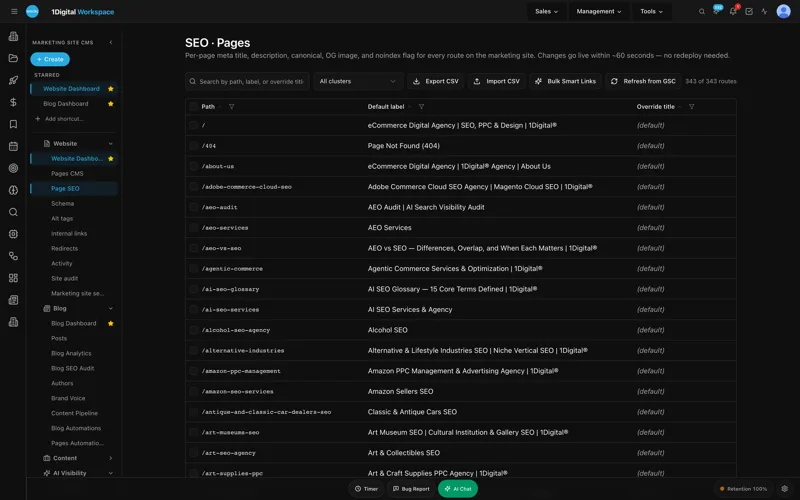
- Page Editor + SEO Sidebar- write and optimize in one view; no Yoast, no Rank Math, no third-party tab-switching.
- JSON-LD Editor with live validation- schema that actually validates, not "passes Yoast but fails Google's structured data tool."
- Redirect Manager- 301/302/307/308 with conflict detection and CSV import for migrations.
- Site Audit- 40+ checks including Core Web Vitals, run continuously, not quarterly.
- Alt-Tag Sweep with brand-voice locking- bulk-generate alt text that sounds like your brand, not like a generic AI.
- Sitemap, robots.txt, and llms.txt auto-regeneration- including the file most CMSs still don't know exists.
- AI Visibility Tracker- ChatGPT, Claude, Perplexity, and Gemini citation tracking inside the CMS.
- Internal-Link Rules engine- rules that fire automatically when new content publishes.
What we tell clients before they switch
We're an agency. We've been doing this for 12 years. We don't recommend platform migrations lightly. So here's the honest version of the conversation we have with every client considering the switch:
- Don't switch if your current CMS works. If you're shipping content quickly, your SEO hygiene is clean, and your team isn't blocked, stay where you are. Migration costs are real.
- Do switch if you're paying for complexity. If your monthly platform spend includes 40% "maintenance and upkeep," you're funding the wrong things.
- Do switch if AI search matters to your category. If your buyers are starting their research in ChatGPT or Perplexity, you need a CMS that tracks that and helps you compete there. Traditional CMSs weren't built for it.
- Do switch if your team is the bottleneck. Content teams should be writing, not babysitting plugins.
Why Businesses Are Switching to AI-Powered Content FAQ
How long does a migration to an AI CMS actually take?
For our standard ecommerce client - about 200 product pages, 50 collection pages, a blog, and a redirect history - the migration runs 3 to 5 weeks. The WorkspaceCMS Redirect Manager imports the entire 301 history as a CSV in under an hour, which is usually the part that scares people most about a migration.
What if we have custom development on our current site?
We handle that case constantly. WorkspaceCMS sits in front of your storefront or runs as your full stack, depending on your architecture. We've done both. A discovery call takes 30 minutes and tells you which approach fits your build.
Is an AI CMS just a wrapper around ChatGPT?
No, and this matters. The AI in WorkspaceCMS is in the workflow - alt-tag sweeps, meta rewriter, blog generator, brand-voice locking. The underlying CMS is a proper SaaS platform with the page editor, redirect manager, JSON-LD editor, and site audit running independent of any LLM call. The AI accelerates the work; it doesn't replace the system.
How is pricing different from HubSpot or WordPress hosting?
WorkspaceCMS pricing is flat-fee, all-inclusive, and pegged to SLA tier - $89, $199, or $449 per month. There are no usage overages, no plugin marketplace fees, no separate AI subscriptions. Compared to a typical HubSpot Enterprise stack at $3,600+/mo, the math is roughly 8x lower for equivalent capability.
Do you white-label this for agencies?
Yes. Growth and Premium plans include white-label admin. We use it ourselves for client accounts and a number of partner agencies do too.
Ready to see what your current CMS is costing you?
If any of those five scenarios sounded uncomfortably familiar, the next step is a 30-minute audit. We'll look at your current platform, your content velocity, your SEO hygiene gaps, and your AI visibility - and tell you honestly whether a switch makes sense. If it doesn't, we'll say so. Book a WorkspaceCMS demo here and we'll walk through your specific setup. Or browse our agency case studies first to see the kind of work we've shipped.