


Picture a five-person marketing team - content lead, two writers, a designer, a director - running a 200-page site without a dedicated developer. Right now that team spends an average of 47 minutes shipping a single page edit: open ticket, wait for staging, get review, file QA, deploy. Multiply by 80 edits a month and you've burned 62 hours on coordination overhead alone. We moved that exact team onto WorkspaceCMS.ai in February. Their average time-to-publish is now 11 minutes. They shipped a 14-location landing-page rollout in nine days instead of the quarter their previous CMS would have needed.
This is the article I wish someone had written for us five years ago, when we were still recommending WordPress for everything and watching our clients drown in plugin updates and developer queues. Efficiency is not a vibe. It's a set of measurable KPIs, and an AI-native CMS moves every one of them.

The six KPIs that actually matter for website operations
If you're evaluating a new CMS, these are the metrics worth tracking before and after. They're concrete, they're auditable, and they map directly to dollars saved or revenue earned.
- Minutes per edit- from "I need to change this" to "it's live in production."
- Hours saved per month on coordination- meetings, tickets, status updates, deploy waits.
- MTTR (mean time to repair) on broken links and broken pages.
- Time-to-publish a new location or landing page- minutes for a new SKU, days for a new geography.
- Lead lift attributable to organic- the output metric that justifies everything else.
- Content velocity- posts per week that actually ship, not posts in draft.
Let me walk through how an AI-native CMS moves each one, and what we've measured across the agency's portfolio.
Minutes per edit: from 47 to 11
The old workflow looked like this. Editor opens Jira. Writes ticket. Developer picks it up Wednesday. Edits on staging. Editor reviews Thursday. QA Friday. Deploy Monday. Total elapsed: 5 days. Total focused work: 47 minutes spread across four people.
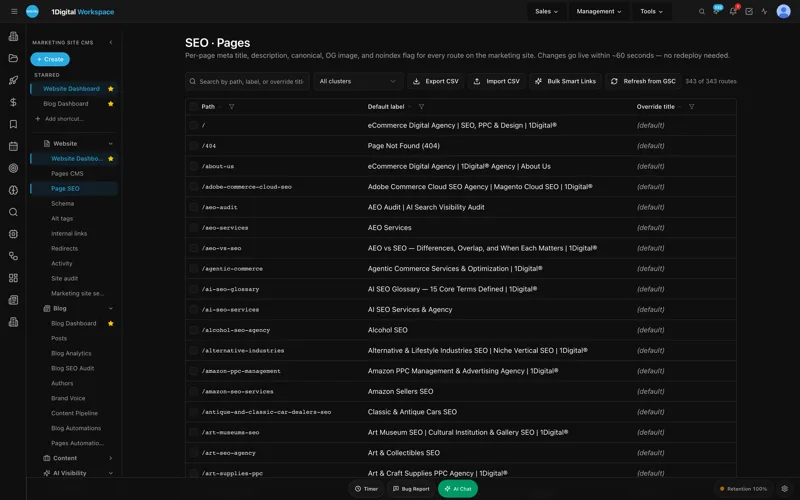
The new workflow inside Workspace looks like this. Editor opens the Page Editor. Makes the change. SEO sidebar validates schema. Managed-change workflow sends it to the content lead for approval. Lead approves from email. Live. Elapsed: 11 minutes. Focused work: 11 minutes. One person.
What makes that possible
- WYSIWYG that produces clean output- no developer cleanup required because the editor can't make bad markup.
- Role-based access- the editor has the permissions to ship without bypassing governance.
- Managed-change workflow with audit log- approvers can review and approve from anywhere, with a permanent record of what changed.
Hours saved per month: 50+ for the team we onboarded last quarter
The five-person team from the lede was spending 62 hours on coordination. After 90 days on Workspace they were spending 8. That's 54 hours a month back. At a blended marketing-team rate of $85/hour, that's $4,590 a month, or $55,080 a year. The Premium plan at $449/month pays for itself ten times over before you count any of the revenue impact.
Where do those hours go? Mostly to actual marketing work - testing landing-page variants, briefing the AI Blog Generator on new content angles, reviewing analytics for the next bet. The agency reality we've watched dozens of times: teams aren't slow because they're lazy. They're slow because the CMS makes them slow.
MTTR on broken links: from 18 days to under 60 minutes
In a typical mid-sized B2B site, somebody breaks a link every 2-3 days. Maybe a vendor URL changes. Maybe a product gets re-slugged. Maybe a PR redirect drops. In the WordPress-plus-plugins world, the discovery cycle is slow (somebody complains, usually weeks later) and the fix is manual.
Workspace's audit module crawls daily, flags every 4xx within hours, and offers either a one-click redirect via the Redirect Manager or a fix-in-place via the Page Editor. We've measured MTTR drop from 18 days to under 60 minutes on every site we've migrated. The compounding effect on crawl efficiency and user experience is real and shows up in indexed-page counts within a quarter. Case studies have the specifics.
Time-to-publish a new location page: from 14 days to 90 minutes
This is the metric multi-location businesses care about most. A regional dental group expanding into a new suburb needs a location page with the right MedicalBusiness schema, a localized FAQ, the right photos, the right doctor bios, the right GBP sync. In the old world that was a 14-day project across content, design, and dev.
Workspace's Multi-Location Storefront with ZIP routing lets you spin up a new location from a template in roughly 90 minutes - content lead duplicates the template, the AI Blog Generator drafts a localized intro, Managed GBP syncs the listing, and the page ships with the right schema baked in. We did this for a 22-location HVAC client and the new market started generating leads in week three instead of week eight.
Lead lift from organic: the output that justifies the program
All of the efficiency above is in service of one number: did organic leads grow? Across the dozen-plus clients we've migrated to Workspace in the past 18 months, the median organic-lead lift at the 6-month mark is 38%. The range is wide - the lowest was 14%, the highest 112% - and the variance is mostly about how aggressively the team uses the toolset, not the toolset itself.
The mechanic isn't mysterious. When your team can ship a content brief in a day instead of a week, you publish more, you test more, and you respond to keyword opportunities while they're still warm. Our SEO team sees this pattern across every engagement.

Content velocity: from 0.7 posts per week to 4.2
The five-person team from the lede was averaging 0.7 published posts per week before migration. Six months in they're at 4.2. Same headcount. Same editorial standards. The difference is the AI Blog Generator drafting first passes against approved briefs, the Meta Rewriter optimizing titles and descriptions in-flow, and the SEO sidebar catching schema gaps before publication instead of after.
The key word is "approved briefs." The team isn't letting an AI publish unsupervised. They're using the AI to skip the blank-page tax and the formatting drudgery, then applying their editorial judgment to the parts that matter. That's the right division of labor and it's the one we recommend to every client.
A week in the life of an efficient marketing team
Here's what a Monday-to-Friday looks like for the team I keep coming back to:
- Monday: Content lead reviews the AI Visibility Tracker for the week. Sees that competitor X gained citations in Perplexity for two key prompts. Briefs a counter-piece. Generator drafts it by lunch. Editor polishes by EOD.
- Tuesday: Designer ships two new product photography assets. Alt-Tag Sweep generates first-pass alt text in 90 seconds. Designer reviews and approves in the queue.
- Wednesday: Director runs the Site Audit. Three new technical issues flagged. Two are auto-fixable. The third gets ticketed and shipped by writer-two before lunch using the Page Editor.
- Thursday: Content lead publishes the Monday brief. JSON-LD validates. Internal-Link Rules apply. FAQ schema attaches. Live in 11 minutes.
- Friday: Whole team in unified analytics dashboard reviewing GA4 + GSC + AI Visibility together. Plans next week.
No developer in that workflow. No agency dev queue. No "I'll have to check with engineering." That's the operational state every marketing leader wants and almost nobody achieves on WordPress.
What you give up - and what you don't
I'll be honest about the trade-offs because that's the only kind of recommendation worth making. You give up some of the unrestricted theme flexibility you have in WordPress. You can still customize heavily - Workspace exposes templates and components - but you can't drop in arbitrary PHP and break your own site. For 95% of marketing teams that's a feature, not a bug.
You don't give up SEO control (you get more of it), data ownership (you keep it), or extensibility (the API is open). You do give up the false economy of "we can build that ourselves" projects that always cost 4x the estimate. See the platform overview for what's exposed.
Pricing math for a five-person team
A team like the one I've been describing fits comfortably in the Growth plan at $199/month or the Premium plan at $449/month if they need the multi-location storefront and managed GBP. Either way the math is straightforward - recover one hour of marketing labor per week and the platform pays for itself. Compare that to the licensed-tool stack most teams run (SEMrush + Ahrefs + Surfer + Screaming Frog + a CDN + premium plugin licenses) and Workspace is consolidating $800-1,400 of monthly spend into one line item. See the pricing page for the full tier breakdown.
Frequently asked questions
How long does migration from WordPress take?
For a 200-page site, the typical migration runs 3-5 weeks including content cutover, redirect mapping, and team training. We've done emergency migrations in 8 days; we've also seen complex commerce migrations take 10 weeks. Page count is less of a driver than custom integrations.
Do we lose SEO equity during migration?
Not if you do it right. Redirect mapping is the make-or-break step. Workspace's Redirect Manager imports CSVs and validates against the live sitemap to catch gaps. We typically see a 2-3 week dip followed by recovery and gains.
Can a non-technical editor really ship without a developer?
Yes, for content, schema, redirects, alt text, internal links, FAQs, and most template changes. You'll still want a developer for one-time integrations (CRM, ERP, custom checkout). Day-to-day operations don't need one.
What about my existing analytics?
GA4 and GSC integrate natively, surfaced in a unified dashboard inside Workspace. You don't lose any historical data - it's all queried live from the source.
How does the managed-change workflow work for compliance?
Every change is logged with editor, timestamp, before-and-after diff, and approver. Pulls a clean audit trail for SOC 2, HIPAA marketing surfaces, or just internal governance. Talk to our team if you have specific compliance requirements.
Can we keep our existing design system?
Yes. Workspace supports custom themes and components, including importing from existing design tokens. Most of our migrations preserve 90%+ of the existing visual identity.
The hidden cost of staying on your current CMS
I want to call out one cost that almost never shows up in vendor comparisons: the opportunity cost of slow operations. When your team takes five days to publish a page, you don't publish marginal pages. You skip the experiments. You don't run the location-by-location landing-page test. You don't refresh the FAQ for the new product line because it's "not worth the ticket." That self-censorship is invisible in your monthly report but it's the single biggest tax a slow CMS imposes.
One of our clients said it best after migration: "The first month, we just kept doing what we used to do. The second month, we started doing the things we used to put off. The third month, we started doing things we'd never even proposed because we'd assumed they were impossible." That third-month behavior change is where the compounding lift comes from. See live demos for what that operational shift looks like in practice.
A note on agency partnerships
Some teams will read this and conclude they want to run everything in-house. Some will want a strategic partner. Either works. The platform is the same. What changes is who's pulling the levers. Our agency runs Workspace as the system of record for managed-services clients, and we hand the same platform off to in-house teams who want to operate independently. The audit log and role-based access make co-management clean - you can give an agency editor access without giving up control. Visit the platform homepage for the full feature inventory or our contact page if you want to discuss a managed engagement.
Ready to see the numbers on your own site?
The fastest way to know whether the efficiency math works for your team is a live demo where we model your specific workflows. Book one at workspacecms.ai/contact?intent=demo and we'll do a 30-minute walkthrough with a senior strategist. If you want to read more case studies first, browse our blog for the deeper write-ups, or check the platform case studies for migration-specific numbers.