

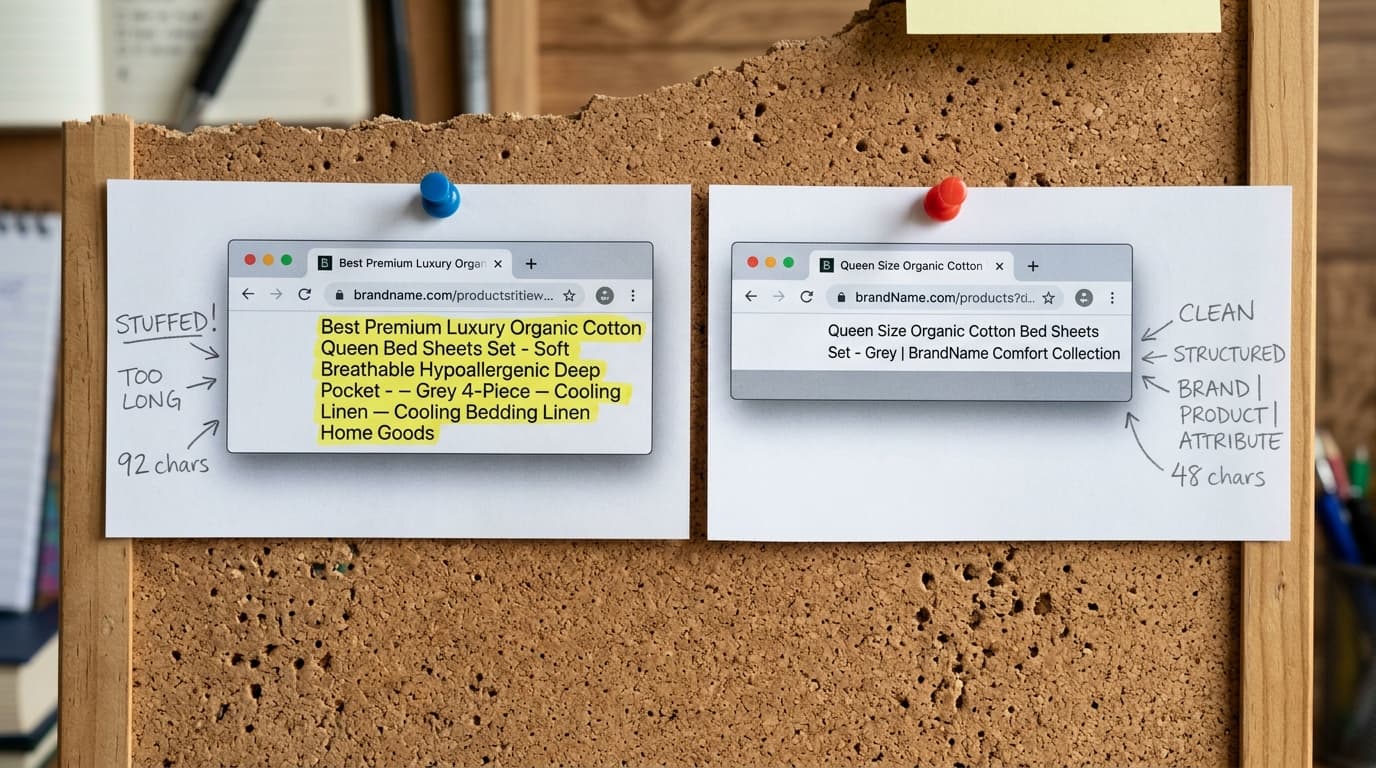
The best product page title tag formula for most ecommerce stores is Primary Keyword (Product Name) | Secondary Keyword (Category) | Brand Name. This structure satisfies search engine algorithms looking for relevance and gives human users the precise information they need to click.
Most of the advice about ecommerce title tags is either uselessly vague or obsessively technical. It treats the title tag as a place for secret SEO voodoo or a line of brand poetry. It is neither. The title tag is a promise made in a crowded marketplace - the search engine results page (SERP). It has two jobs: signal relevance to a machine and signal value to a human. Getting it wrong costs you the click, and the click is everything.
Most Product Titles Fail from Neglect or Overthinking
Almost every struggling ecommerce store we audit has the same product title tag problems. The failure patterns are consistent enough to name.
The first is simple neglect. The store owner lets their CMS, like Shopify, generate a default title. This is usually just `Product Name | Store Name`. It’s not terrible, but it leaves money on the table. It misses the opportunity to include a category or use-case keyword that could capture a wider, non-branded audience searching for a type of product, not your specific one.
The second failure mode is the opposite extreme: keyword stuffing. This is the hallmark of someone who read an SEO blog post from 2009 and never updated their thinking. The title becomes a desperate, unreadable list of search terms. For example: `Red Running Shoe | Best Running Shoes | Buy Cheap Sneakers | Free Shipping`. This doesn't just look spammy to a user; it also dilutes the focus of the page for search engines, which are now smart enough to understand semantic relationships without being beaten over the head with them.
A title tag is not a creative writing exercise; it's a matching mechanism. Your goal is to match the user's search intent so perfectly that clicking your link feels like an inevitability.
Four Title Tag Formulas to Test
These formulas are not magic. They are logical structures designed to convey the most important information within the ~60 character limit that Google typically displays. Start with Formula 1 as your default, and use the others for specific situations.
1. The Standard Formula (Your Default)
This is the workhorse for 90% of product pages. It's balanced, informative, and covers the most critical elements.
Formula: Primary Keyword (Product Name) | Secondary Keyword (Category) | Brand Name
- Example:
Apex Strider Trail Shoe | Men's Hiking Boots | YourBrand
Why it works: The product name is first, which is what users see first and what algorithms weigh most heavily. The secondary keyword or category helps you rank for broader terms (like "men's hiking boots"). The brand name builds recognition and helps with branded searches. This structure is the canonical best practice for a reason.
2. The Modifier Formula (For CTR)
This formula adds a "hook" to entice a click. Modifiers are words that signal a specific value proposition.
Formula: Modifier + Product Name | Category | Brand Name
- Example:
Sale: Apex Strider Trail Shoe | Men's Hiking Boots | YourBrand - Example:
Free Shipping on FleetFoot 5s | Women's Running Shoes | YourBrand
The honest tradeoff: Using modifiers like "Sale," "Cheap," or "Free Shipping" can increase your click-through rate, but it may also attract customers who are only interested in a bargain. This is not necessarily a bad thing, but you must be aware of the kind of traffic you are attracting. Use it when the modifier is true and central to your offering.
3. The Use-Case Formula (For Specific Needs)
Sometimes, what a product does is more important than what it is. This formula leads with the benefit or application.
Formula: Use Case + Product Name | Brand Name
- Example:
Waterproof Commuter Backpack | The Nomad Pack | YourBrand
Why it works: It directly targets users searching for a solution to a problem. Someone looking for a "waterproof commuter backpack" has a very specific, high-intent need. By putting that use-case first, you signal an immediate match. This is especially effective for technical or specialized products where the application is the primary selling point.
4. The Problem-Solver Formula (For Pain Points)
This is a close cousin of the use-case formula but focuses more directly on a customer's pain point.
Formula: Audience/Problem + Product Name | Category | Brand Name
- Example:
Shoes for Size 16 Feet | The Coulter Boot | YourBrand - Example:
Hypoallergenic Dog Food | PureBites Lamb & Rice | YourBrand
Why it works: This approach builds an instant connection with an underserved or specific audience. Seeing your exact problem reflected in a search result is a powerful motivator to click. It tells the user you don't just sell a product; you understand their specific situation.
How We Implement Title Tag Optimization
Optimizing title tags isn't a one-time project. It's a system. In practice, our process is straightforward and data-driven.
First, we extract a full list of product URLs and their current title tags. We use tools like Screaming Frog for this. Then, we pull keyword data from Google Search Console and Ahrefs to identify the primary keyword (usually the product name) and the highest-volume secondary keyword (the category or use-case) for each product.
Next, we build a spreadsheet that maps the current title to a proposed new title based on the formulas above. The Standard Formula is our default. We apply the others only when the search data or product type justifies it. This spreadsheet becomes the canonical plan.
The mistake to avoid: blindly applying a formula without looking at the SERP. Always search for your main target keyword and see what the top-ranking competitors are doing. If they all include a specific piece of information (like model number or size), you should consider it too. The SERP is the ground truth.
Your Next Step: Test, Don't Guess
Don't overhaul your entire site at once. That's a recipe for confusion. Start with your top 10-20 pages by traffic or revenue. Apply the most logical formula to each, implement the changes, and annotate the date in Google Analytics.
Wait 30 days. Then, go into Google Search Console and compare the click-through rate and average position for the 30 days before your change to the 30 days after. The data will tell you what works for your audience. That data becomes the roadmap for optimizing the rest of your product catalog.
Product Page Title Tag Formulas That Drive Clicks for FAQ
How long should an ecommerce product title tag be?
Aim for 55-60 characters. Google truncates titles longer than that on most desktop and mobile devices, so anything beyond that limit is often wasted. Keep the most important keywords at the beginning.
Should I put my brand name in the product page title tag?
Yes, for most stores, you should. Typically, it should go at the end. This helps with branded searches, reinforces brand recognition in the SERPs, and helps differentiate you from resellers or marketplaces.
Is it okay to change my Shopify meta titles?
Yes, and you absolutely should. The default Shopify title structure is a starting point, not an optimized final product. Regularly testing and refining your meta titles based on performance data is a core part of ecommerce SEO.
Should I include the price in the title tag?
Generally, no. Prices change, and managing those updates in your title tags is impractical. Instead, use a product schema markup to make the price eligible to appear as a rich result in the SERP. This is more sustainable and effective.