


When To Use Shopify Custom Designs
Shopify is one of the eCommerce industry’s leading platforms for online business owners. Their mission is to provide a better eCommerce experience for all of the business owners who put their trust in them. They created a platform that is comprehensive and hassle-free. This lets businesses focus on promoting, building, and selling their products. There are over 400,000 active Shopify stores with a total of over $34 billion dollars worth of sales; many of these active stores use Shopify custom templates and designs to create a unique look for their storefront.
It’s no accident that Shopify is a go-to platform for eCommerce business owners. It has over 100 professional and beautiful themes. But, it also gives you the ability to create Shopify custom designs for your brand and store. Shopify provides templates and intuitive admin controls that allow you to give that personal touch to your store. Are you are familiar with web design code? Shopify also offers full access to both the HTML and CSS of your design. This makes it even easier to create a custom feel for every aspect of your store.
All of Shopify’s templates are designed to work well a multitude of different businesses and products. Utilizing Shopify custom designs are an exceptional way to make sure your business stands out. Do you want to build a consistent and comprehensive brand across all platforms for your business? Using a custom design for your Shopify storefront, the heart of your business is the best way to do that.
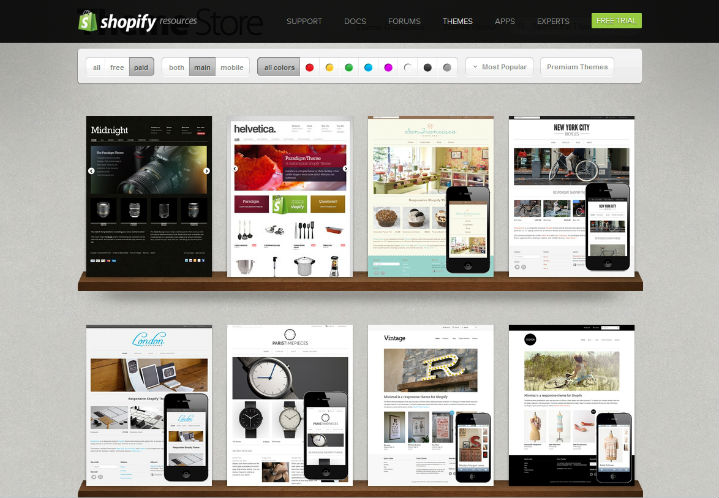 Variety of Shopify Pre-Made Templates
How To Decide Whether Customization Is Right For Your eCommerce Business
The draw of pre-made templates is the fact that they can help your eCommerce storefront get up and running in a relatively short amount of time. So, how do you know when to make the decision to go with a Shopify custom design?
First, you should consider what type of functional requirements your business is going to need with its eCommerce design and function. Do you feel like the best way to display your products is through a more specific layout design? Then a Shopify template may not allow you to personalize your product pages entirely. Also, if you want a variety of variant options on your product page, Shopify customization won’t limit you the way a pre-built template would. Essentially, any functionality options that you feel you will want specialized to your business and products are great reasons to choose the custom design route. For example, if you’re going to need more advanced navigation or filtering options for your product pages, you may not be able to with a free template.
Another important thing to consider is how much you value having control over your own business. You do have some aspect of control in choosing a free or paid theme. However, it is putting a lot of design decisions in a pre-built layout. If you want to have control over the design and functionality of your website and how it can reflect your brand, then custom designs are for you.
Customization Overview For Shopify
When you use Shopify custom designs, you are creating a system for ease of use that is straightforward and intuitive for your customers as you control the experience. The first thing to do when you are looking to make any custom changes to your Shopify template, you have to change your theme (available on your Themes page). You have two options when it comes to changing your theme. You can publish an entirely different theme to your store. Or, you can keep your current theme and make customizations to the areas you want. You can do this in one of two ways. You can go to the “Customize Theme” page (top photo). Or, you can make custom changes directly in the “Edit HTML/CSS” page (bottom photo).
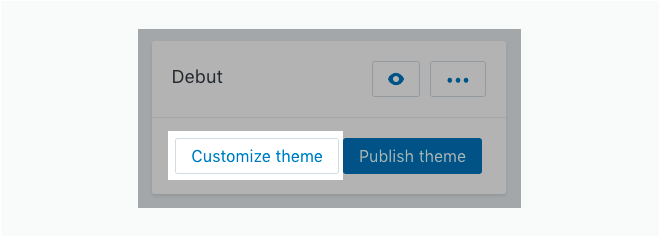 Customization Page For Shopify Custom Designs
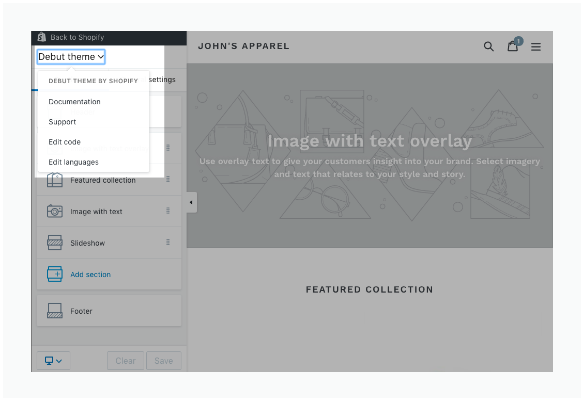 HTML/CSS Page For Shopify Custom Designs
The “Customize theme” page allows you to change the built-in settings of your theme through your Shopify admin page. The customize theme page has several categories of settings to change for your custom design. This page includes the header, image with text overlay, featured collection, an image with text, creating a slideshow, adding a custom section, or changing the footer. You can access this page and make these changes on your desktop computer. You can also use the Shopify app available on iPhone or Android.
The “Edit HTML/CSS” page is designed for people who are familiar with design code and feel comfortable creating Shopify custom designs through coding. You can also access this page through desktop, iPhone, or Android. Several file categories within the themes are available for customization, including layouts, templates, snippets, assets, configs, locales, and sections.
Get A Custom Shopify Design with 1 Digital Agency
So, you’ve decided that a Shopify custom design would be best for your business. But, you may be feeling overwhelmed with either the complexity of making customizations or dabbling in all that code. Or you’re nervous about the task of keeping all custom changes on brand with your business. Maybe you’re just not very tech savvy and went some help with design and development of your Shopify eCommerce business. That’s exactly where 1 Digital Agency can come in and help you.
 1 Digital Agency Services For Shopify Custom Designs And Development
At 1 Digital Agency, we are an approved premier partner with Shopify. We have a team of experts that are complete pros at design and development for Shopify custom template design. We have designers who specialize in code and customization and have been making specific Shopify custom designed sites worldwide. Whether you need a design from scratch, you want a redesign with specific customizations, or you want to recreate your brand and have it reflected in your eCommerce business, our Shopify designers can do it all.
1 Digital Agency’s Shopify services don’t end with design and development. We can also assist your eCommerce business and Shopify platform with data migration as well as digital marketing. Our marketing team can help with content, emails, social media and an effective SEO campaign. If you have any questions about our services with Shopify, call us now at 888-982-8269. Or contact us and find out more about how we can help your business!