


Customize BigCommerce Store Designs and Build Your Unique Brand
BigCommerce is a comprehensive platform that provides business owners like you the complete eCommerce package including the ability to set up and customize BigCommerce store designs by yourself (or you can hire experts like us to do it for you). It has everything you need to start your eCommerce business and make it successful. There are no complicated installations and integrations involved, and with a little bit of luck, you can create something that will stand the test of time.
There is a reason that BigCommerce is so popular in the world of eCommerce. It comes with built-in systems that allow you to take existing themes (paid or free) and customize them to create something exceptional. Needless to say, every brand needs its own unique voice and look. While standard templates perform exceedingly well, you cannot stand out from the competition using them. There are bound to be many others like you using the same theme, and your brand could lose its identity in the mix. You need to customize BigCommerce themes to give your brand an added layer of personality.
The thing about BigCommerce templates is that they all use HTML and CSS. This gives you unlimited versatility as far as template customizations go. So while you can do basic modifications easily through the Design Mode, the more complex ones require you to know HTML and CSS. If you don’t have the time to do it all yourself, you can turn to professionals like 1 Digital Agency to customize BigCommerce designs for you.
Customize BigCommerce Through Design Mode
The Design Mode is truly one-of-a-kind and the simplest customization system you will find anywhere. It gives you the opportunity to customize BigCommerce themes using a simple drag and drop menu. You can reorder or remove items on any page of your store. Unfortunately, its biggest strength is also its weakness. When you use Design Mode to customize BigCommerce designs, other than reordering things on your web pages or removing something completely, you can’t do anything else.
In any case, Design Mode has its uses, especially if you are looking for basic modifications. You can access it by clicking on the Store Design tab and then the Design Mode tab in the Control Panel. Once you do that, the design mode is enabled, and you can start customizing.
To use the design mode, you will then need to visit the page of your store you want to customize. There should be a toolbar visible to you on the top of the page (see below) which is indicative of the Design mode being enabled.
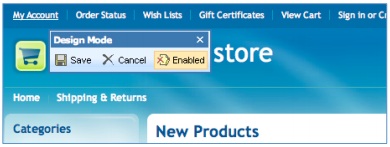
The drag and drop functionality is a walk in the park. On any page that you want to customize, move your pointer to the item you want to move. The pointer will change shape. Now drag that item using the left mouse button to the place you want it to appear and let go. If you want to remove an item, right click on it and select Remove Panel from the menu. Once you’ve made all adjustments to a page, save and enjoy your handiwork.
Using Quick Edit to Modify Your Store
Like we’ve said before you can customize BigCommerce templates using the Design Mode, but that is hardly ever sufficient. There is only so much you can do with reordering and removing items from your designs.
Another way you can customize BigCommerce templates it is through the stylesheet editor. The Browse Template Files option in the Store Design tab allows you to edit the CSS of any template file of your theme. You need to know HTML and CSS to be able to customize BigCommerce from here, but this is easily the more effective way to do it. In fact, the majority of customization that professionals like us make to themes are through the Quick Edit option.
Once you enter the editor, you will see lists of template files in the left-hand column. The first portion contains files from the template that are in use, while the other one shows all the remaining templates files for the theme, grouped according to their type.
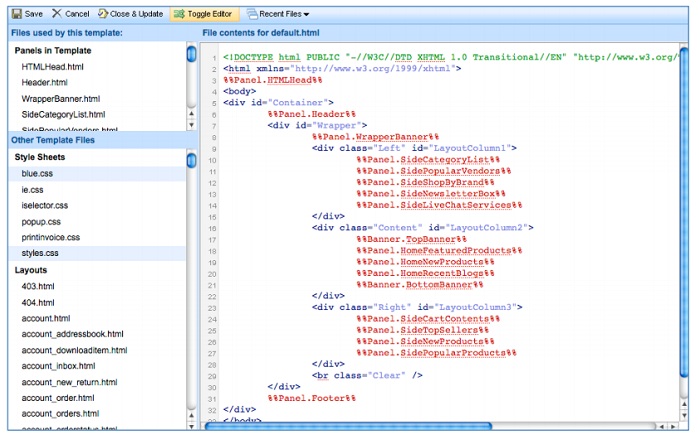
When you click on any template file, the editor opens up on the right (see above). It shows all the coding of that template, and you can make any changes to the HTML here. This is incredibly tricky and should be left to experts who understand HTML.
Customize BigCommerce Designs via FTP
When you think to customize BigCommerce, more often than not, you will find that every aspect of a theme is customizable as long as you know how to do it. For the basic stuff, we’ve talked about the Design Mode. For more advanced BigCommerce customizations, there is the HTML editor or Quick Edit. But this is not all. There is also the provision for FTP access to a special directory that gives users (expert users) the chance to modify everything that is not possible with the other two options.
You will need to connect your store via FTP to the directory. You can upload files here, which will then have to be linked back to your BigCommerce store. The best way to do this would be to download a ZIP archive of all the template files of your template and modify the ones you need to change. The file types that you can upload include HTML and CSS, images like .jpg, .jpeg and .png and media files like .flv, .fla, etc. Keep in mind that these uploaded files will have different URL links than those present in the template files. You will have to incorporate these new URLs in the stylesheets or web pages where they are being utilized.
2019 UPDATES:
With the online digital world steadily growing and on the rise, eCommerce platforms need to be constantly updating their options and functionalities. While the content above is still incredibly useful for all BigCommerce store owners, there are a few updates that have been made since this blog was first published.
THE WYSIWYG Editor
WYSIWYG: What You See Is What You Get. This BigCommerce editor can be used for web pages, banners, products, and categories. This editor is a “front editor,” which means that it allows you to edit the content of the specific pages mentioned above without changing any of the code. The WYSIWYG allows you to format text, create links, add images, video and other media, and create tables. If you prefer to not use the editor, there is a disable button that can be clicked within your Store Settings.
BigCommerce Style Theme Editor
If you purchased a BigCommerce theme and want to customize it, simply head to your BigCommerce storefront and click on “My Themes.” This will bring you to a page with a screen that looks like this:
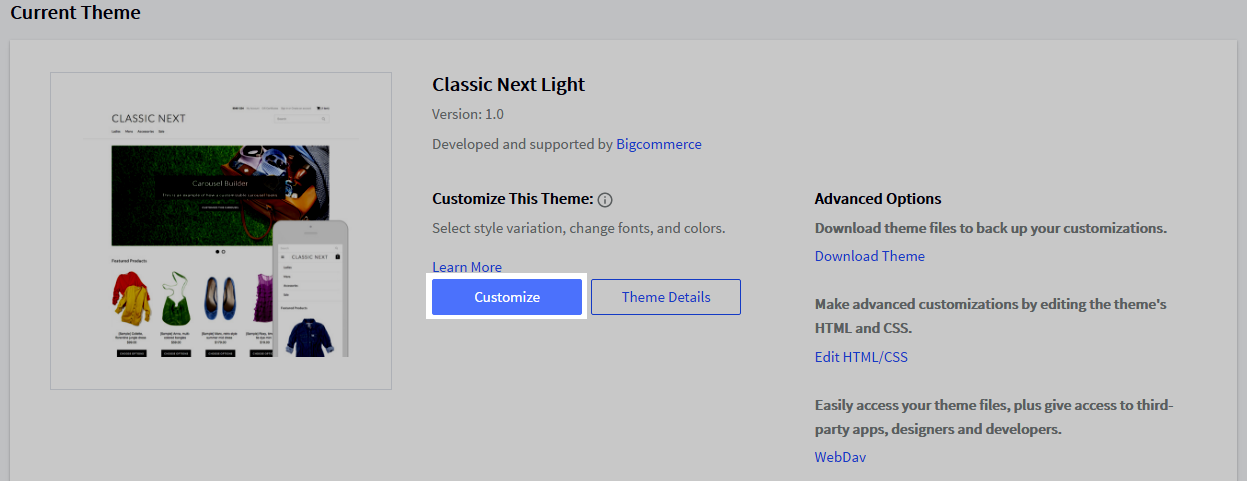
After you click on the “customize” button, a new window will open with the Style Editor panel to the left of your screen.
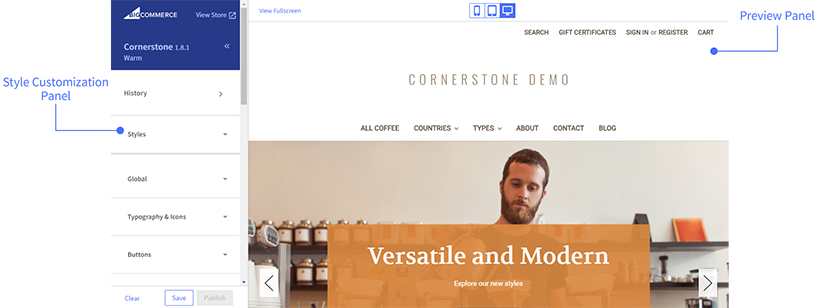
Whether you have a BigCommerce store with the Blueprint theme or the Stencil theme, BigCommerce lets you change the look and feel of your storefront with the Style Editor without changing any of the code. With both the Blueprint and Stencil themes, you can change fonts and colors, image sizes, add product columns and more to make your site more customized to your brand and preferences.
Customize HTML and CSS code
If you are in the Style Editor and find that you are unable to make some changes, then you will need to look into editing the HTML and CSS code of your theme. To do this, you will need to download the theme you want to edit. It will look like this:
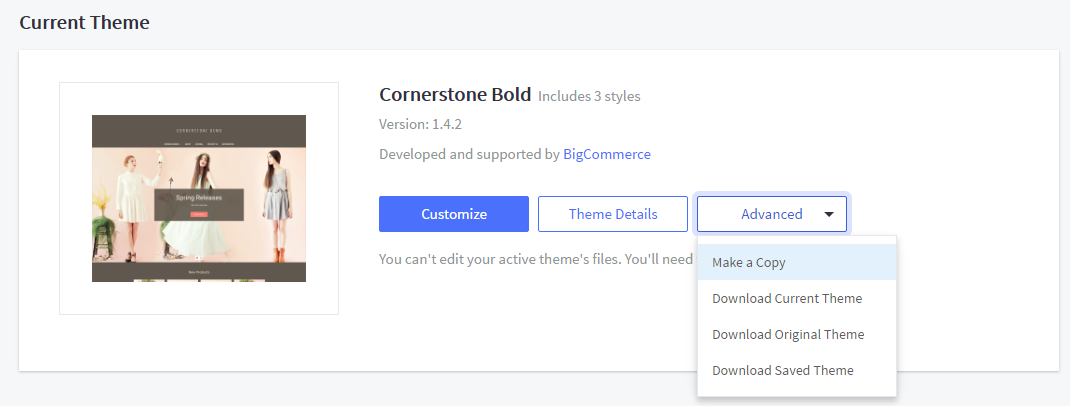
Once you down the theme you want to work on, save it on your computer and you are good to start making your edits and customizations. If you are unfamiliar with web development, however, then it is highly recommended to get someone with in-depth knowledge to help you so that you do not run into any major issues that could cause your entire site to be faulty.
BigCommerce Store Customization With the Best Digital Agency
Building a brand is more than coming up with a good logo and tagline. Your eCommerce store needs to epitomize everything that your brand stands for. While BigCommerce is easily your go-to eCommerce platform, you need to customize BigCommerce templates to create a site design that is truly unique.
At 1Digital Agency, we have experts that know the ins and outs of BigCommerce customizations and custom BigCommerce store template designs. More than that, we understand eCommerce and can give you expert advice on how to actually connect with your customer base with designs that catch their eye, are user-friendly and, most importantly, unique to your business ideology.
With UX and UI in mind, our expert eCommerce designers and developers will take your vision and transform it into a functional, top-notch eCommerce website design that is fully responsive and entices users to continue to explore the pages of your online store. They’ll integrate aspects of your brand into every decision they make with your site. From colors to fonts, images and more, your website will draw in the right users and keep them engaged long enough to lead to a higher conversion rate.

Our experts have been working with BigCommerce since the very beginning. We have a versatile portfolio of work that speaks for itself. Not only do we customize BigCommerce designs but we also provide marketing and development services. As a certified BigCommerce partner, we are proud to say that we have built our reputation on the foundations of hard work and a commitment to make each project a success. Call us now on 888.982.8269 or contact us via our website and let us show you what we can do.