



Your Full-Service Digital Agency & AI Strategy Partner
1Digital
1Digital®/Platforms

Custom WordPress Web Design

Block themes (FSE), tokenized design systems in theme.json, Gutenberg pattern libraries, ACF Pro for B2B content models, and accessibility-first builds - for brands that take WordPress seriously. 15 years of WordPress specialization.

WordPress Specialists · Since 2012

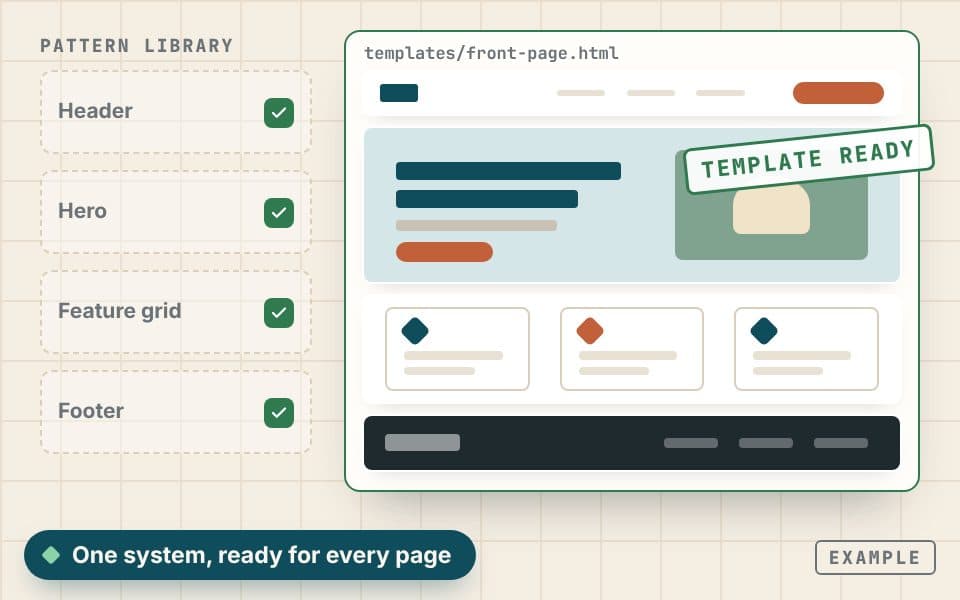
templates/front-page.html
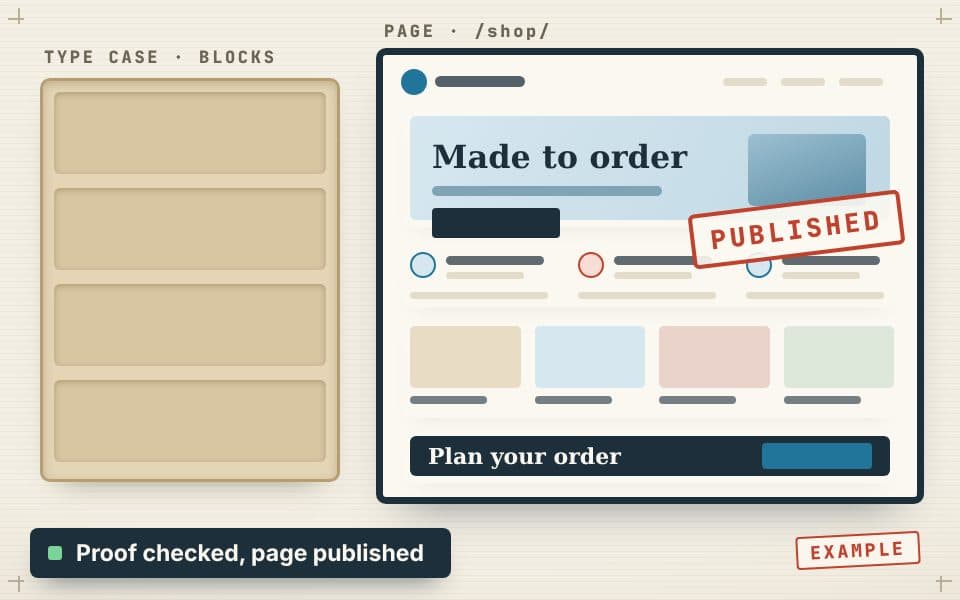
Example front-page template assembled from header, hero, feature grid and footer block patterns, colored by theme.json

Example build. Patterns are the tiles, theme.json is the glaze.

Launch criteria · LCP
<2.5s
Launch criteria · INP
<200ms
Launch criteria · CLS
<0.1
Accessibility
WCAG 2.2 AA

Trusted by 400+ Brands · Certified Partners

Google Partner
BigCommerce Elite Partner
Shopify Plus Partners
Neil Patel
15

Years in eCommerce

Of results, scale, and quality at the enterprise level.

50+

Expert Team

Specialists across SEO, AI SEO, PPC, design, dev, and strategy.

USA

US Core + Global Talent

US core team for clear communication; vetted global specialists for international client work.

4.9

Reputation Score

Rated 4.9/5 across 100+ verified client reviews.

Reviewed by the 1Digital® Engineering TeamLast updated:

Why a WordPress Specialist Matters

WordPress That Reads Like a System

Most WordPress sites are theme purchases stretched well past their useful life - page builders fighting Gutenberg, plugins fighting themes, and editors afraid to touch anything.

We design WordPress like a real CMS: tokenized design system in theme.json, block patterns as the merchandisable component library, ACF Pro for structured content, and a Site Editor experience your team can ship without breaking the brand.

Cross-link with our WordPress practice, development, and SEO teams.

Plate 01 · the system, layer by layer
  1. theme.jsonDesign tokens: color, spacing, type
  2. Block patternsThe merchandisable component library
  3. ACF ProStructured content models
  4. Site EditorTemplates your team ships safely

WordPress design, step by step

A design system, then a site built from it

Colors, type and components are set once, then every WordPress page is assembled from them. That keeps the site consistent from the header to the checkout and makes new pages quick to add, with the call to action exactly where the visitor is ready to get in touch.

  • ›Colors, type and buttons defined once and reused
  • ›Every WordPress page assembled from the same parts
  • ›New pages added quickly without breaking the look

TL;DR

What a WordPress design engagement delivers

Eight pieces, laid as one set. Each tile is part of the same system, glazed from the same tokens.

  • 01Custom block theme (FSE) - no commercial theme bloat
  • 02theme.json design-token system
  • 03Pattern library as the design system
  • 04ACF Pro for structured B2B content
  • 05Site Editor templates per content type
  • 06WCAG 2.2 AA accessibility
  • 07Core Web Vitals as launch criteria
  • 08Editor guide + role-based governance

What We Deliver

WordPress Design, Deep Stack

Plate 02 · example

Plate 02

Design Systems in WordPress

Tokenized design system in theme.json (colors, spacing, typography, layout sizes), block style variations for design-system component variants, custom block patterns as the documented component library, and Site Editor templates for every content type. The system lives in code, not Figma.

  • Color, spacing and type tokens in theme.json
  • Block style variations for component variants
  • Editor styles mirror the front end
Plate 03 · example

Plate 03

Editor UX & Governance

Locked patterns where brand consistency matters; flexible patterns where content velocity matters. Custom Site Editor templates per content type, role-based capability tuning so non-developers can ship safely, and an editor guide documenting the pattern library and content workflow.

  • Locked patterns for brand-critical sections
  • Flexible patterns where content velocity matters
  • An editor guide for the pattern library
Plate 04 · example

Plate 04

Accessibility-First Builds (WCAG 2.2 AA)

Semantic structure, color contrast (AA throughout, AAA where feasible), keyboard navigation, visible focus states, ARIA where appropriate, screen-reader patterns, reduced-motion handling, and skip-links. axe-core + manual NVDA / VoiceOver passes before launch. Section 508 / AODA compliance when scoped.

  • axe-core + manual NVDA / VoiceOver passes
  • Keyboard navigation with visible focus
  • Section 508 / AODA when scoped

Also in every build

Tile 05

Custom Block Themes (FSE)

Full Site Editing themes on WordPress 6+. Global styles via theme.json (spacing scale, type ramp, color tokens, fluid typography), block patterns as the merchandisable design system, template parts for header / footer / sidebars, and a Site Editor experience your marketing team can ship without a developer in the loop.

Tile 06

Gutenberg Pattern Systems

Pattern libraries built as the design system - section-level patterns (hero, feature grid, testimonial wall, CTA banner, comparison table) registered with category taxonomies. Lock attributes on brand-critical patterns so editors can't break visual integrity. Pattern previews in the Inserter, synced patterns when shared content is the right call.

Tile 07

ACF Pro for B2B Sites

Advanced Custom Fields Pro for complex content models - option pages, repeater fields, flexible content layouts, ACF Blocks for custom editor experiences, and Bidirectional Relationships when content needs to reference content. The right tool for B2B catalog sites, technical product configurators, partner directories, and resource libraries.

Tile 08

Core Web Vitals & Performance

LCP <2.5s, INP <200ms, CLS <0.1 as launch criteria. Lazy image loading, responsive srcset, font subsetting + preload, CSS scoping per block, JS deferred / split, plugin overhead audited, Redis object caching standard, and CDN deployment (Cloudflare or BunnyCDN) wired in.

Tile 09

Plugin Architecture Discipline

Strict plugin budget - fewer, better plugins beat plugin sprawl every time. Audit, prune, replace. Where off-the-shelf doesn't fit, we build (custom blocks, ACF Blocks, mu-plugins, custom REST endpoints). Less attack surface, smaller maintenance load, better performance.

B2B & Technical Sites

When WordPress Has to Do Real Work

B2B and technical sites push WordPress past its content-CMS comfort zone - gated documents, partner directories, faceted resource libraries, multi-language with proper hreflang, Salesforce / HubSpot form sync. ACF Pro plus a disciplined custom-post-type architecture makes WordPress do this work cleanly.

ACF field group · resource
LanguageMulti-language content (WPML / Polylang) with proper hreflang
AccessMember / restricted content (MemberPress, Restrict Content Pro)
Form syncSalesforce / HubSpot / Pardot form + CRM sync
Post typeCustom post types for products, case studies, partners, resources
SearchFaceted search with FacetWP or SearchWP
Flexible contentACF flexible content for landing-page assembly
NetworkMultisite networks with shared design system
File · gatedDocument libraries with gated PDFs + analytics

The Stack

How We Build It

The stack matters because the long-term cost of WordPress is plugin sprawl and host drift. We default to fewer, better components - and a host with serious operational rigor.

Ten courses. Fewer, better components.
Plate 05 · the stack
  • 01WordPress 6.x (latest stable + LTS branches)
  • 02Block themes + theme.json design tokens
  • 03Gutenberg block API (native React + JSX)
  • 04Advanced Custom Fields Pro + ACF Blocks
  • 05WP Engine / Kinsta / Pressable hosting
  • 06Cloudflare CDN + R2 / BunnyCDN for media
  • 07Redis Object Cache, Object Cache Pro
  • 08WPGraphQL when headless on Next.js
  • 09WP-CLI for deploys + content ops
  • 10Bedrock / Composer-managed installs

WordPress Design - Quick Answers

What does custom WordPress design actually include?

A custom block theme (no commercial theme bloat), a theme.json design-token system, a pattern library that doubles as the design system, ACF Pro for any non-trivial content modeling, Site Editor templates per content type, WCAG 2.2 AA accessibility, and Core Web Vitals targets (LCP <2.5s, INP <200ms, CLS <0.1) as launch criteria. The deliverable is a system, not a one-shot template.

Should we use a block theme (FSE) or a classic theme?

Block themes (Full Site Editing) are our default for new WordPress 6+ builds - global styles, block patterns, template parts, and a merchandisable design system editors can ship without developer dependency. Classic themes still make sense for very specific legacy migrations or when a plugin in the stack doesn't yet support FSE. We make the call on the first call.

Why ACF Pro over native custom fields or Gutenberg-only?

Native custom fields are a UX dead-end for editors. Gutenberg-only works beautifully for content-led sites; for B2B and technical sites where content models include option pages, repeaters, flexible content, and bidirectional relationships, ACF Pro is the difference between a maintainable system and a museum of inline HTML. We use both - Gutenberg for content authoring, ACF for structured data.

WordPress Web Design FAQ

Do you build block themes from scratch or extend Twenty Twenty-Four / Twenty Twenty-Five?

Custom block themes from scratch using @wordpress/create-block-theme tooling. Extending a default theme works as a learning exercise but the template part and pattern overrides get noisy fast. We start with theme.json + a lean style.css + custom block.json registrations, and build out from there.

How does the design system live in WordPress?

theme.json carries the tokens (colors, spacing scale, type ramp, layout sizes, fluid typography ranges, custom-property exports). Block patterns are the documented component library. Block style variations expose component variants. Editor styles mirror front-end styles 1:1. The design system is code, version-controlled, and shipped with the theme - not a Figma library that drifts.

What about WooCommerce design?

WooCommerce is its own design discipline - block-based Cart and Checkout, Product Collection blocks, HPOS-compatible custom queries, and a design system tuned to PDP / PLP / cart flows. For WordPress-only marketing and content sites, we stay focused on the editorial / corporate / B2B use case. For commerce, see WooCommerce design - it's a separate engagement with separate considerations.

Performance - can WordPress really hit Core Web Vitals?

Yes - but it requires discipline. Lean block theme (no commercial theme bloat), strict plugin budget, image pipeline with responsive srcset and modern formats, font subsetting + preload, deferred / split JS, server-side caching (Object Cache Pro on Redis), edge caching (Cloudflare / BunnyCDN), and a hardened managed host (WP Engine, Kinsta, Pressable). Targets: LCP <2.5s on PDP, INP <200ms on key interactions, CLS <0.1.

Accessibility - what's the standard?

WCAG 2.2 AA throughout, with AAA where the brand-style cost is reasonable. Semantic markup, color contrast verified with WebAIM contrast checker, keyboard navigation tested with no mouse, visible focus states, ARIA where appropriate (no aria-everything anti-pattern), screen-reader patterns tested with NVDA + VoiceOver, reduced-motion preference respected, and Section 508 / AODA when scoped. axe-core in CI.

How do you handle content migrations from old WP sites?

WP CLI export + transform + import for posts and taxonomies, ACF field migrations via WP CLI custom commands, media library migration with attachment metadata preserved, and a redirect map for any URL structure changes. We pre-build the destination content model so we're not retrofitting field mismatches after the fact.

What's the timeline for a WordPress redesign?

Marketing / corporate site (15–30 pages, custom block theme, content migration, no commerce): 8–12 weeks. B2B / technical site (30–80 pages, ACF-driven content models, multi-language, custom CPTs): 12–20 weeks. Multisite network or membership platform: 16–24+ weeks. We give you a written timeline after a 30-minute scope call.

Who's involved on our side?

One stakeholder with decision authority, one content lead who'll own the editor experience post-launch, and access to brand assets / existing analytics. We provide UX research, IA, design, build, content migration, QA, and launch. You provide direction, sign-off, and the content. Light input on your side; heavy lifting on ours.

A system, not a one-shot template

Lay the system once

One stakeholder, one content lead and your brand assets on your side. UX research, IA, design, build, migration, QA and launch on ours.

Introducing

Your Industry. Your CMS. Managed for You.

  • Unlimited managed edits - shipped on your plan's SLA
  • SEO baked into every page, post, and location
  • Technical SEO on every plan; AI schema and internal linking on Premium & Ultra
UnlimitedManaged edits included
AI-firstContent tools built in
SEO-nativeRich search results automated
On-timeUpdates shipped on schedule

Real strategists. Real AI tools. Real growth.  -  1Digital® since 2012