


“Pivot to video” got a bad reputation when it described publishers chasing video at the expense of reporting. Strip away the controversy, though, and the underlying signal is real and has only strengthened: video is more digestible and drives more engagement than text for many audiences, and shoppers increasingly expect it. For eCommerce email marketing specifically, video is one of the most effective ways to lift engagement – if it’s implemented correctly. This guide covers how.
Editorial note: this article was originally published in 2018 as part of a series and has been updated. A then-current prediction about social feeds becoming “entirely video,” a tool typo, and an incomplete closing line have been corrected; the platform-specific steps reflect the durable approach rather than any one provider’s 2018 UI.
Why video belongs in eCommerce email at all
Email’s job is to get a subscriber to engage and click; video is unusually good at earning that engagement in a crowded inbox because it communicates a product faster than a paragraph can. The strategic point is not “use video because it’s trendy” – it’s that a short product demo, unboxing, or how-to answers buying questions in seconds that text answers in scrolling, and answered questions convert. Treat every email video as a tool to remove a specific purchase hesitation, not as decoration.
Keep it short and sweet
Video’s advantage is fast, low-effort engagement – and that reverses the moment it becomes a chore. Long videos drive viewers to bounce and depress engagement, the same way an overly long article does. One to two minutes is the practical sweet spot for email: enough to deliver something genuinely useful before the call to action, short enough that a busy subscriber finishes it. If the content truly needs more time, put a teaser in the email and the full video on a landing page, so the email stays tight and the click is the conversion event.
The call to action is the whole point
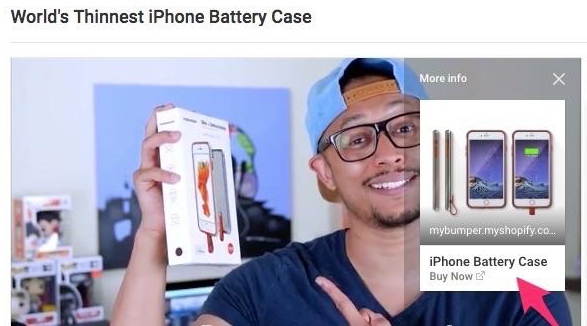
The CTA is the most important part of the video – it’s what brings viewers back to your site, onto other channels, or into sharing. Interaction with the CTA is also the metric by which you judge whether the video worked, so make it explicit and measurable. YouTube supports in-video cards and end screens that place an attractive link back to your site. Tools like Wistia add interactive elements – Wistia calls them “turnstiles” – that gate continued viewing behind an email signup or another action, which doubles as a list-growth mechanism when the video also lives somewhere other than the email itself. Whatever the platform, decide the single action you want before you script the video, and design the whole piece toward it.
Use sharing to grow the list
Sharing is one of the strongest engagement loops a video has, and it’s an underused list-growth channel. If the content is genuinely worth passing on, ask for it explicitly – a line like “If you know someone who’d find this useful, share it” paired with an obvious share or forward button measurably increases forwards. Every forward is a warm introduction to a potential subscriber that cost you nothing, which makes shareable video one of the cheapest list-building tactics available.
Make videos easy to view and share – and never autoplay
Host on a major platform – YouTube or Vimeo (uploading to both never hurts) – so the video embeds cleanly across email service providers and reliably plays for everyone a subscriber shares it with. Most ESPs handle this through a simple merge mechanism that pulls a clickable video thumbnail into the template (Mailchimp, for example, uses a video merge tag); follow your provider’s current documentation for the exact syntax, since these UIs change. One rule does not change: never autoplay. Few things spike bounce and unsubscribes like intrusive autoplay – the click should always be the viewer’s choice, which also makes the click a meaningful engagement signal.
Measure the right things
To know whether email video is working, watch the metrics that map to the goal: click-through on the video thumbnail or CTA (did it earn the action?), the downstream conversion rate of those clicks (did the right people click?), forwards and shares (is it spreading?), and unsubscribe rate on video sends (is it welcome?). View count alone is vanity; a video with modest views and a high click-to-conversion rate is outperforming a heavily watched one that converts no one. Let those numbers, not aesthetics, decide which video formats you make more of.
A simple starting playbook
If you’re adding video to email for the first time: pick one high-intent moment (post-purchase how-to, a best-seller demo, or a welcome-series intro), produce one 60–90 second video with a single clear CTA, host it on YouTube or Vimeo, embed it as a clickable thumbnail (no autoplay), and add an explicit share prompt. Measure click-to-conversion, then iterate on the format that performs. One disciplined video beats a library of unfocused ones.
What kinds of video actually work in eCommerce email
Not every video earns its place in an email. The formats that consistently perform map to a specific point in the customer relationship: a 60–90 second product demo in a consideration email that shows the thing in use; an unboxing or first-use video in a post-purchase email that reduces returns and support tickets by setting expectations; a how-to or tutorial in a retention sequence that increases the odds the customer succeeds with the product and buys again; a founder or behind-the-scenes story in a welcome series that builds the brand relationship; and customer or review videos as social proof in a re-engagement campaign. Each is tied to a moment and a measurable outcome, which is what separates video that lifts revenue from video that just adds weight to the email.
Accessibility and the no-sound reality
A large share of email is opened on phones, often with sound off, and not every subscriber can hear audio at all. Design for that: burn in captions or provide them, make the thumbnail and first frame communicate the message without sound, and never rely on audio to deliver the call to action. Captioned video is also more shareable and more inclusive – the same change that helps a commuter watching silently helps a subscriber using assistive technology. Treating sound as optional rather than assumed is one of the highest-return, lowest-effort improvements you can make to email video.
Do these things and you’ll use video in eCommerce email far more effectively. The real trick with email is making messages subscribers are glad to see – well-produced, purposeful video, presented correctly, goes a long way toward that. If you’re struggling to get traction and engagement, consult the email marketing professionals at 1Digital® Agency.