


How to use Google Adwords search network and display network
The world of PPC (Pay per Click) advertising on Google AdWords can seem pretty mysterious. It has a lot of dark and winding hallways, and you can sometimes feel that if you wander too far down them you might get lost. If you’re trying to run your own PPC campaign, we’d like to try to light up one or two of those dark corridors.
When you buy PPC advertising you have two options for where to host your ads: the search network and display network. This post is going to explain what these networks are, and how to make your ads for your eCommerce business work in either of them.
Ads posted in the search network are probably what you picture when you think about PPC. They’re those listings that show up at the top and bottom of Google’s SERP (Search Engine Results Page). These listings are more expensive, but lead to more click throughs and conversions. The search network can also place ads like these on Google’s search partners, like AOL or Ask.com, if you choose to.
The display network is not as associated with PPC, but still very much a part of paid advertising on Google. When, at the bottom of an article or blog post, you see a section labeled ‘sponsored links’, or see banners on the sidebar of your favorite websites, those are PPC ads posted in Google’s display network. The AdWords display network is the biggest digital ad network in the world. Unlike search network ads, you may use banners, and images in display network ads. Display network ads are cheaper, but have lower click through and conversion rates.
The search network costs more, but delivers better results, and the display network is the flipside. The numbers specifically relating to the eCommerce industry seem to support those general trends. Wordstream recently released the findings of a study that incorporated over 2,000 of their US based clients, representing more than 34 million dollars in ad spend, to determine the exact effectiveness of both networks across a variety of industries. Let’s see how eCommerce holds up in the PPC game.
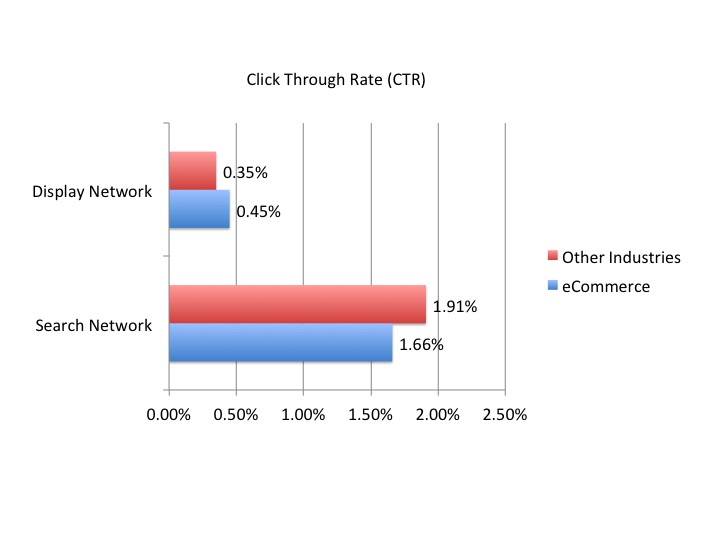
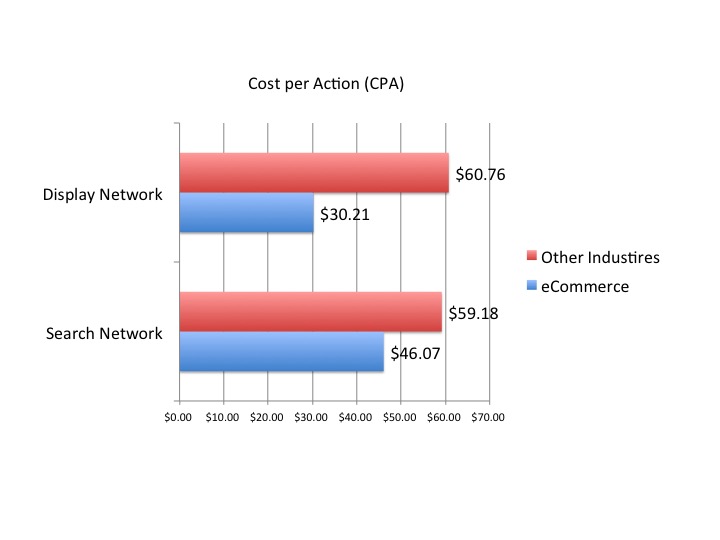
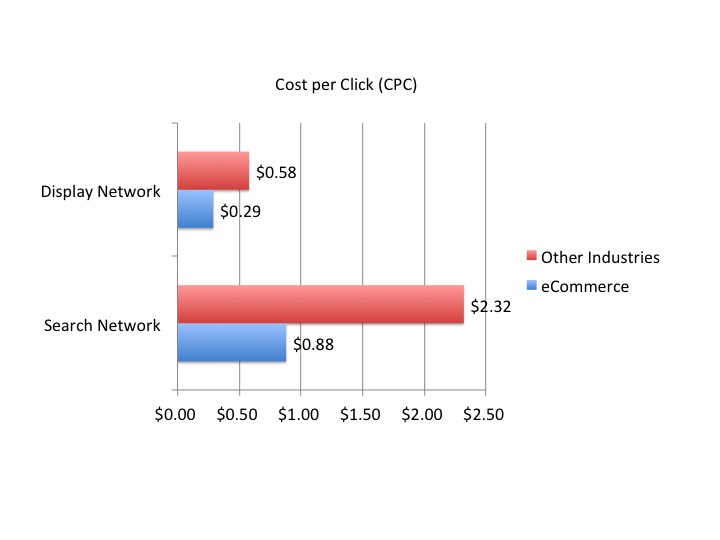
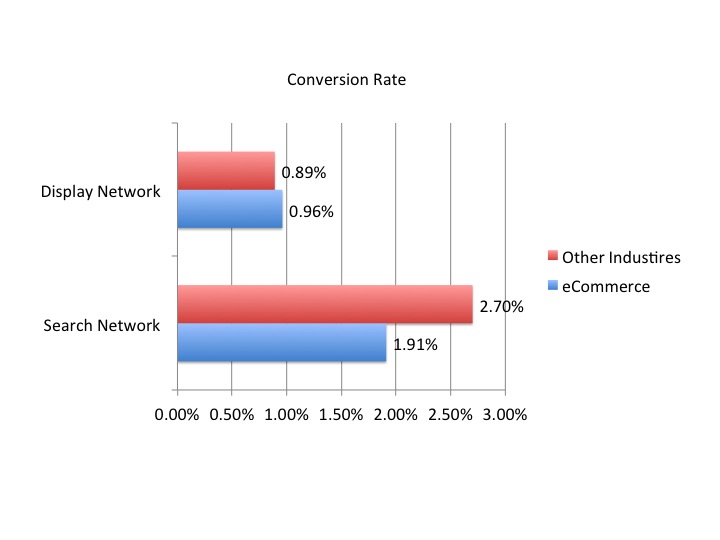
(click to enlarge)
As you can see eCommerce has a small advantage over other industries when it comes to the display network, coming in with slightly higher than average CTR’s and conversion rates. eCommerce also does really well in CPC, coming in at half of the average price in both networks. Wordstream’s findings show that eCommerce PPC campaigns deliver a pretty good bang for your buck. eCommerce sites can get a slight results advantage, for a much lower cost.
So let’s say that you want to place paid ads in both these networks. Because their results are so different, the ads you place should be different as well. When you advertise on the search network, the people seeing your ads are already searching for the product you offer. These customers just need a reason to click your ad instead of someone else’s. Try listing some kind of offer or benefit in your ad copy. For example, you might mention a warranty, or a coupon code.
The display network is a little bit trickier, because the people seeing display network ads are not as far long in the sales funnel. People seeing your display network ads are, at best, still in the research phase. It’s beneficial to offer them some useful information, instead of a straight up sales pitch. Also keyword targeting is going to have to be a much more subtle science, if you want your placements to have any effect.
Google offers four different types of keyword targeting for the display network, they range from specific to general:
Placement Targeting lets you specify a certain publisher’s site you’d like your ads to be placed on.
Contextual Targeting allows you to give Google keywords, and have it automatically find relevant articles under which it can place your ads.
Topic Targeting is very much like placement targeting except that it allows Google to work with websites related to a topic instead of a specific publisher.
Interest Targeting works like topic targeting, but instead of placing ads on web pages related to a topic, it tracks the behavior of users, and places ads in front of audiences you choose to target.
We recommend that you don’t rely on any of these targeting methods by their lonesome, but that you create multiple ad groups, each with different combinations of these targeting specifications. For example, if you sold men’s jackets, you could combine a Placement Targeting of GQ.com, with a Contextual Targeting for Fall Fashions. Make a few of these combos, see how they preform against each other, and whittle them down until you find the perfect one. Pause the ad groups that aren’t working, and continue to make variations on the one that is.
There are upsides and downsides two both networks in Google Adwords. If you have a bigger budget, and want results right away, place ads in the search network. If you have a smaller budget, and a little more time to hone your technique, the display network may be the way to go. And if all this seems a bit overwhelming to you, you could always hire professionals to place your ads for you.
Choosing the Right Network for Where the Customer Is
The cleanest way to decide between the search and display networks is to map each to a stage of buyer intent. Search-network queries are active demand: someone is typing “buy waterproof hiking boots” right now, so a tightly themed ad and a matching landing page convert at a high rate and justify the higher cost-per-click. Display-network impressions are latent demand: the person is reading an article, not shopping, so the job of the ad is to create or reinforce awareness cheaply and feed retargeting later. Treating display traffic with the same conversion expectations as search traffic is the single most common reason advertisers conclude “display doesn’t work” - they were measuring a top-of-funnel channel with a bottom-of-funnel ruler.
Match Types Decide How Much Control You Keep on Search
On the search network, keyword match type governs how loosely Google can interpret your keywords:
- Exact match ([running shoes]) triggers only on that query and very close variants - highest control, highest relevance, lowest volume.
- Phrase match (“running shoes”) requires the meaning of the phrase to be present - a middle ground.
- Broad match (running shoes) lets Google match on intent and synonyms - highest volume, highest risk of irrelevant spend unless paired with a strong negative-keyword list and Smart Bidding.
A disciplined account uses a regularly updated negative keyword list as its primary cost-control lever. Mining the search-terms report weekly and adding non-converting or off-intent queries as negatives is what keeps a broad-match campaign from quietly draining budget.
A Modern Note on Display Targeting
Editorial note: this post originally described AdWords using the legacy product name and its older display targeting taxonomy (Placement, Contextual, Topic, and Interest targeting). Google Ads still offers the conceptual equivalents - placements, keywords/topics for content targeting, and audience segments (in-market, affinity, and custom segments) for people-based targeting - but third-party-cookie deprecation and the shift toward Performance Max and audience signals have made people-based and first-party-data targeting the dominant approach. The strategic point below is unchanged.
The original recommendation still holds and is worth sharpening: never rely on a single targeting dimension. Build several ad groups that combine a content signal (a relevant placement or topic) with an audience signal (an in-market or custom segment), let them run against each other, pause the losers, and iterate on the winner. Layering a content signal with an audience signal is precisely the structure Performance Max automates today - the manual version simply makes the logic visible so you learn what is actually driving conversions.
Run Both, but Budget Them by Goal
The practical takeaway is not “search good, display bad.” It is to fund search for revenue you can attribute this week, fund display for the cheaper reach and retargeting that compounds over months, and judge each on the metric appropriate to its place in the funnel. eCommerce advertisers in particular tend to see strong relative cost efficiency in both networks, which makes a two-network program with separate goals more profitable than forcing one network to do the other’s job. If managing that split becomes a distraction from running the store, our eCommerce PPC management team handles the structure and the ongoing optimization.