

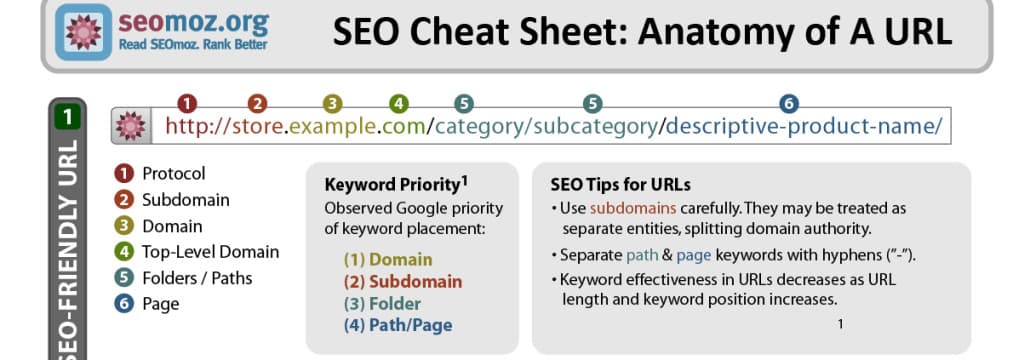
A page's URL is one of its most important components and one of the most overlooked. The URL is the address that points a user (and a crawler) to a specific page. On eCommerce sites the structure of that address depends heavily on the platform, and because every product has its own page, a store can have hundreds or thousands of unique URLs branching off the main site. It's tempting to assume that thousands of unique URLs are automatically great for SEO - but it's the structure of those URLs, not their quantity, that affects rankings.
It's a Trap: Why Messy URLs Hurt
Historically, overly complex URLs caused crawlers to get "stuck" - wasting crawl budget on infinite parameter combinations or failing to index pages cleanly. A page that isn't indexed doesn't appear in search results, which silences an entire channel of organic customers. On large catalogs the modern version of this problem is faceted-navigation and parameter URLs (sort orders, filters, session IDs) generating near-infinite low-value variants of the same page. The result is wasted crawl budget, duplicate-content dilution, and important pages indexed slowly or not at all.
ABC - Easy as 123: Use Clean Characters
URLs should contain only lowercase letters, numbers, and hyphens. Avoid question marks, exclamation points, spaces, uppercase, and other punctuation. These may make a URL technically unique, but they don't help search engines understand or index the page, and they make links harder to share and read. Use hyphens, not underscores, to separate words - that's the word separator Google has long recommended.
Just the Facts: Make URLs Readable and Descriptive
A URL should be as short as possible while still conveying what's on the page. Compare these two for a t-shirt store:
http://www.awesomeshirts.com/men/productid3971213=details?.html
This tells us the site sells men's items and little else - the product ID is meaningless to a human and to a crawler.
http://www.awesomeshirts.com/men/cotton-longsleeve-blue
This is a strong URL: short, simple, and it tells the shopper exactly what they'll find before they click. Readable URLs also earn more clicks when shown in search results and look more trustworthy when shared.
Get the Whole Structure Right, Not Just the Slug
A clean slug is only part of the job. A few structural principles matter just as much:
- Keep the hierarchy shallow and logical. A path like
/category/subcategory/productmirrors how shoppers and crawlers navigate; avoid burying products many levels deep. - One canonical URL per product. If color/size variants or filters create multiple addresses for essentially the same page, use canonical tags so ranking signals consolidate on one version instead of splitting.
- Keep keywords meaningful, not stuffed. Include the term that describes the page once, naturally. Repeating keywords in the path looks manipulative and doesn't help.
- Stay consistent. Pick one pattern (lowercase, hyphenated, no trailing parameters) and apply it across the whole catalog so the site is predictable to crawl.
The Critical Rule: When (and When Not) to Change URLs
Most eCommerce platforms let you edit URL structure, so optimization is achievable on virtually any store. But timing is everything. URLs should be optimized when a site is first built, during a migration, or when it's being significantly restructured anyway. Changing URLs on an established, indexed site is risky: the "roads" leading to your pages - existing rankings, backlinks, bookmarks - are already built around the old addresses, and changing them carelessly destroys that equity.
If an established site does need URL changes, the non-negotiable safeguard is 301 redirects: every old URL must permanently redirect to its new equivalent, one-to-one, before the change is considered finished. Then update internal links to point at the new URLs directly (rather than relying on the redirect), refresh the XML sitemap, and monitor Search Console's coverage and the affected pages for a few weeks to confirm the new URLs are indexed and rankings transferred. On an established site, only restructure URLs when there's a clear reason - for example, an SEO specialist has identified that crawlers are genuinely struggling to index the site - and never as a cosmetic change.
Frequently Asked Questions
Will changing my URLs hurt SEO? Changing them without 301 redirects will. With correct one-to-one redirects, internal-link updates, and a refreshed sitemap, a cleaner structure helps.
Hyphens or underscores in URLs? Hyphens. Google has long treated hyphens as word separators and underscores as joiners.
Should I put keywords in URLs? Include the descriptive term once, naturally. Keyword-stuffed paths don't help and can look manipulative.
A Pre-Launch and Pre-Migration URL Checklist
Because the cheapest time to get URLs right is before they're indexed, fold this into every build and migration: confirm the platform is set to human-readable slugs, not ID-based paths; standardize on lowercase, hyphenated, parameter-free URLs across products, categories, and content; keep the folder hierarchy shallow and logical; decide the canonical strategy for variants and faceted pages up front rather than retrofitting it; and, for a migration specifically, build the full one-to-one old-to-new redirect map and test it on staging before go-live, not after traffic drops. A migration that launches without a verified redirect map is the single most common cause of a sudden, avoidable organic traffic collapse - and it's almost always discovered too late, when rankings have already been lost.
URL structure is an important ranking factor but only one of many. Our ecommerce SEO experts at 1Digital® build and migrate stores with clean, redirect-safe URL architecture as part of a complete SEO program. Get in touch or start with a free ecommerce SEO audit.