

Used effectively, pre-orders are a simple and powerful tool for protecting revenue and growing an eCommerce business - not just a workaround for empty shelves.
Crowdfunding and Kickstarter campaigns proved the value of selling a product before it's produced: entrepreneurs validate demand before committing capital. Shopify merchants can apply the same logic routinely. If a supplier tells you a restock will run late, a pre-order (or back-in-stock) flow lets customers commit now instead of buying from a competitor. The same mechanism builds anticipation for an upcoming release. With a few changes to your product pages and a pre-order app or your theme's native inventory settings, an out-of-stock SKU becomes a revenue and demand-signal opportunity instead of a dead end.
Capture Demand With Back-in-Stock Notifications
If you'd rather not manage active pre-orders or backorders, a back-in-stock notification still rescues otherwise-lost sales and, just as valuably, gives you a hard demand signal: the number of customers who asked to be notified is real data for your next purchase order. A simple email/SMS capture takes the customer seconds.
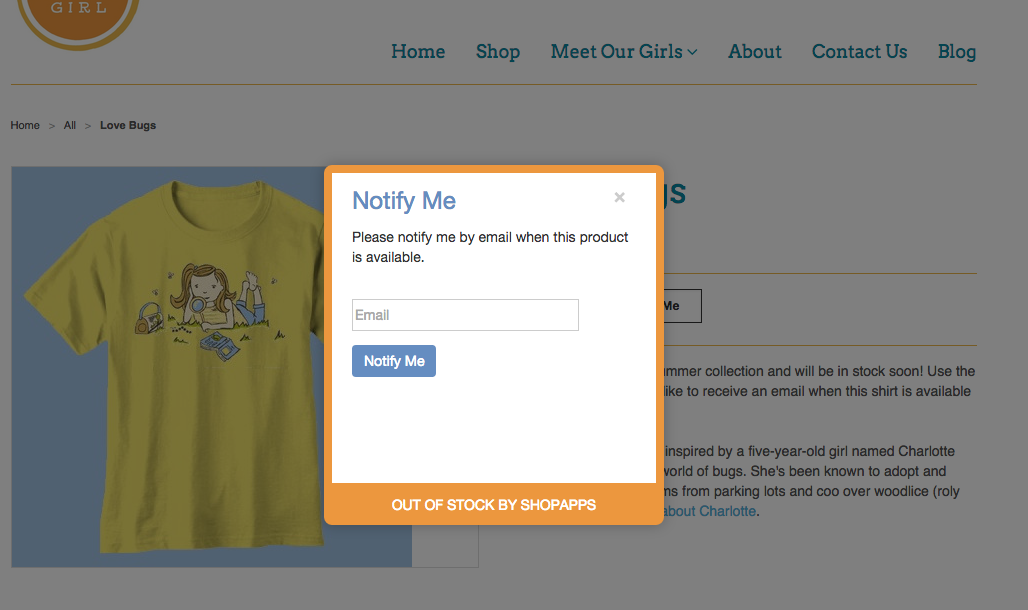 Photo courtesy of Shopify
Sell New Products on Pre-Order to Validate and Build Hype
Shoppers love being first to a hot new item. If you've sourced something that won't land for a few weeks, promote it early and let customers pre-order. Positive results tell you to order deeper; weak results are equally valuable - they save you from over-ordering. Either way you've converted dead waiting time into both cash flow and a demand forecast.
A pre-order button also carries a psychological signal: it implies desirability and a touch of scarcity. In the Rex 2 example below, the prominent pre-order button conveys that there's risk in waiting.
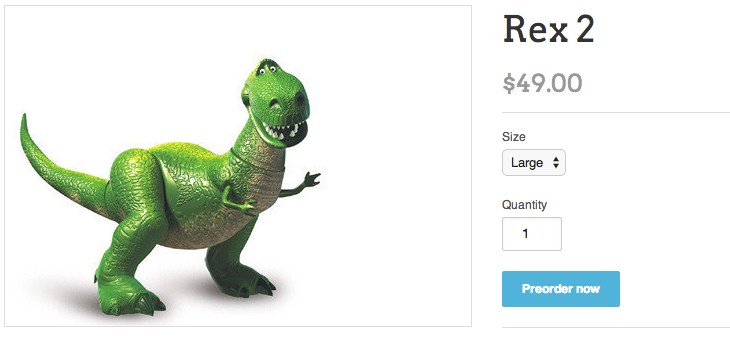 Photo courtesy of backinstock.org
Allow Backorders Only When You Can Honor Them
Unexpected things happen - weather, freight delays, customs holds. As long as you know stock will arrive, accepting orders and scheduling fulfillment keeps revenue you'd otherwise lose and builds loyalty with customers who appreciate the transparency. The operative word is transparency: state the expected ship date on the product page and in the confirmation, and don't promise a date you can't hit.
Set It Up Right on Shopify
Practically, you have two routes. For occasional backorders, your theme plus Shopify's "Continue selling when out of stock" inventory setting can be enough. For real pre-order programs you'll want a dedicated pre-order app so you can label the button clearly, set per-product ship dates, and control fulfillment. Two decisions matter most: charge now vs. charge on ship (charging later reduces refund and chargeback risk if a date slips, but charging now improves cash flow and commitment), and clear expectation-setting everywhere the customer looks. Whichever you choose, make the pre-order status unmistakable on the product page, in cart, at checkout, and in the confirmation email.
Comply With the Rules
Pre-orders involve taking money for goods that ship later, which is regulated. The U.S. FTC's Mail, Internet, or Telephone Order Merchandise Rule requires that if you can't ship by the stated date (or within 30 days when no date is specified), you must notify the customer and offer a prompt refund or a chance to consent to the delay. Build that into your process: an honest ship date, proactive communication if it moves, and a frictionless refund path. Done right this protects the trust pre-orders are meant to build.
The Net Effect
Used well, pre-orders build desire, imply scarcity, protect revenue against stockouts, generate a real demand forecast, and deepen loyalty through transparency. The strongest eCommerce platforms ship features as capable as this - but a feature's value only materializes when you exploit its full potential and operate it honestly.
When Pre-Orders Are the Wrong Tool
Pre-orders aren't free. Done carelessly they create more problems than the sales are worth, so it's worth knowing when to skip them. Avoid open-ended pre-orders when your supply date is genuinely unknown - an indefinite "coming soon" with money taken is the fastest way to generate refund requests and chargebacks. Be cautious with high-fashion or perishable goods where the customer's need is time-bound and a slipped date makes the order worthless. And don't run pre-orders if your operations can't actually track promised ship dates per SKU and communicate proactively when one moves; the tactic depends entirely on follow-through, and a pre-order you can't honor damages trust far more than a simple "out of stock" ever would.
Promote the Pre-Order So It Actually Sells
A pre-order button no one sees generates no demand signal. Treat a pre-order launch like a small product launch: tease it to your email and SMS list, feature it on the homepage and in collections rather than burying it on a single product page, and consider an early-access window for loyal customers, which both rewards them and front-loads the demand data you're trying to collect. The marketing around the pre-order is what converts the empty shelf into a forecast; the button alone just makes it possible.
Frequently Asked Questions
Should I charge customers immediately or on shipment? Charging on shipment lowers refund and chargeback risk if a date slips; charging now improves cash flow and commitment. Match the choice to how confident you are in the ship date.
What if the ship date slips? Notify customers proactively and offer a prompt refund or the option to consent to the delay - this is both good practice and, in the U.S., required under the FTC's order-merchandise rule.
Native Shopify setting or a pre-order app? The native "continue selling when out of stock" setting suffices for occasional backorders; a dedicated app is better for real programs needing clear labeling, per-product dates, and fulfillment control.
Want help implementing pre-orders, back-in-stock flows, or a higher-converting product page on Shopify? Our Shopify developers and conversion optimization team can set it up properly. Get in touch.