


Google has recently lifted the veil on how the search engine measures impressions, position values, and click data. In the Search Analytics report the search giant describes the heuristics of each measurement, however, reminds the reader that as the search algorithms are constantly evolving, the measuring techniques are subject to change.
Impressions
Impressions track the appearance of your website across all search results. This measurement does not include engagement with your website, it only measures the frequency at which your website’s URL appears as a search result. As the classic blue-link result of any Google search, you are likely already very familiar with these results. However, for example, here is a very basic search result that includes only one link: the title “The Compleat Guide to Daffodils – Example.com”.

The URL this link directs toward records an impression when the user searches for a relevant keyword or factor resulting in the display of this link. Note that the URL itself (green text) is not a hyperlink, and as such, the title “The Compleat Guide to Daffodils” is what registers the impression.
If a single search contains several results (as nearly all do) impressions are counted by the URL or by site, depending on your view in the Search Analytics report. When grouped by site, all impressions of individual website pages are combined into a single impression for the website overall. However, when grouping by page each result counts toward an individual impression.
If you look at the Search Analytics report with data grouped by site, only one impression is counted in total for the entire card:
– example.com – 1 impression
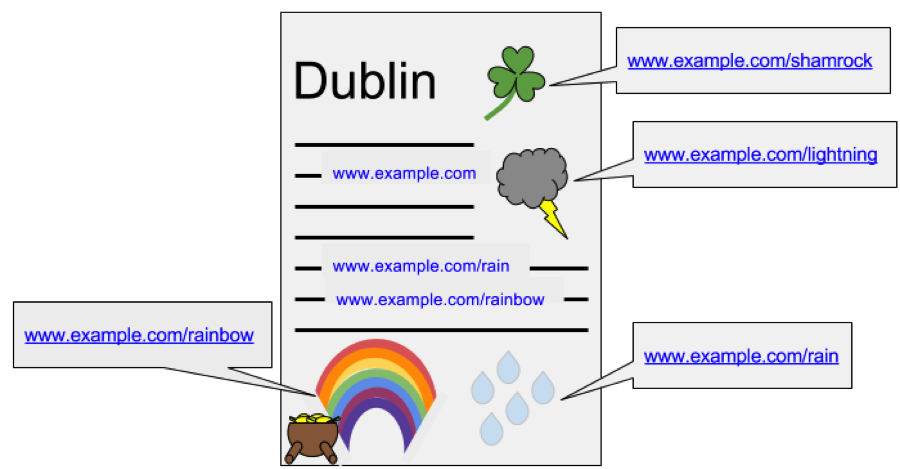
However, if you look at the report with data grouped by page, you would see five pages with one impression each:
– example.com – 1 impression
– example.com/rain – 1 impression
– example.com/rainbow – 1 impression
– example.com/shamrock – 1 impression
– example.com/lightning – 1 impression
As a result, the term impression may hold multiple values as a result of the specificity of your inquiry.
Position
Google searches can host a variety of results depending on the context of your inquiry. The order of these results may vary depending on the device type, search features, and screen size. This being said position is always calculated top to bottom, left to right (or right to left in RTL languages).
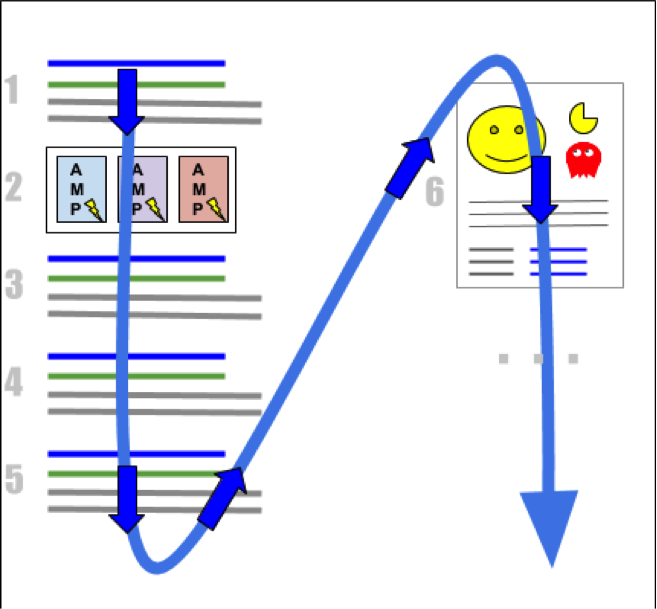
Most search results include a numeric value defining each position on the page. The above image contains four blue links (1, 3, 4, and 5) in addition to an AMP carousel (2) and a Knowledge Panel card (6). All links within a single element have the same position. As such all items in the AMP carousel shown above are position 2, all links in the Knowledge Panel have position 6, all links in the blue link block in position 5 have position 5, you get the idea.
What qualifies for a position ranking?
If you click on a link within search results that performs a new query, this is called a query refinement. What this means at its core is, links that redirect to a new query or page within Google.com do not hold position rankings as they do not link to an external website or page. Elements that have no links, or only query refinement links, do not occupy a position, however, there are 2 exceptions to this. Advertisements are a separate function of Google and do not occupy a position. Some image thumbnails do (eventually) lead to a third-party web page, and as such do count as a position placeholder.
Position Value Determination
The search analytic report of your website’s position value is the average of topmost results. So, for example:
– If one query returned your site at positions 2, 4, and 6, its position is counted as 2 (the topmost position).
– If a second query returned your site at positions 3, 5, and 9, its position is counted as 3.
– The average position across these two queries is (2 + 3)/2 = 2.5.
If your website result is listed on page 3 of Google’s result page, and the user never loads this page, no impression is recorded. When viewing your search analytics report, you may find some sections represented by a dash (-) for the position value. This simply means that your link did not receive an impression, and as such the analytic field is void.
The intricacies of position ranking determine the value of result placements. For example, one may assume position 1 is more valuable than position 6 due to an imitative numerical hierarchy. However when accounting for the type of position held, numbers are not the only factor, in the diagram above position 6 was the Knowledge Card, which aligned horizontally with position 1 but occupied a larger area. As a result, in that query position 6 may be considered more valuable than position 1. For example, here are just a few possible explanations of a position value 11 for an element:
– In a desktop search, it could mean the top right side position in a Knowledge Graph card
– In a desktop search, it could mean first item on page 2 (if the first page had nothing on the secondary side)
– In desktop image results, it could mean the second or third row of results (visible without scrolling)
– On mobile, it could mean the sixth row of results (visible only with scrolling)
In order to effectively determine the relevance of your website’s position, monitor change in position over time. In addition take particular note of sudden position changes and adjustments to the absolute position.
Click
Clicking results in the user exiting Google’s interface with the intention of opening an outside page. Any links that remain within Google’s system (query refinement links) do not result in a click being measured. Clicking on a result, returning to Google, and the re-clicking the same result only counts as one click.
For more information detailing the intricacies of image positioning, app install links, AMP pages, and more read the full Webmaster article here. Knowledge is the precursor of action. When aiming to improve your search engine optimization ranking, reach out to 1Digital Agency’s team of digital marketers. Our SEO is tailored to the unique demands of each eCommerce client, allowing us to create a uniquely personalized strategy for your business.